Stocky shut down on 31 August 2026. See your replacement options Stocky closed 31 Aug: export window and replacements
Pricing verified: 25 September 2026
Updated October 2026 · Free TikTok server-side tracking · ~10 min read
Closes the browser tracking gap · Runs on Make.com's free tier · No monthly fee

Your TikTok ads are
flying blind.
Fix it free, no code.

TikTok Events API is a server-to-server connection that sends Shopify purchase events directly to TikTok without passing through the browser, bypassing iOS restrictions and ad blockers. To connect it, add a Shopify order-paid webhook pointing to a free Make.com scenario that posts a CompletePayment event to TikTok with your Pixel ID and Access Token. It is a no-code setup.

TikTok says the Events API reports conversions the Pixel misses through “connectivity issues and browser inconsistency”, and recommends running it alongside your existing Pixel (About Events API). Its Advanced Matching matches email, phone and other identifiers to events sent through the Pixel or the Events API. On Safari, Intelligent Tracking Prevention deletes cookies set by script after seven days without a visit. Checked 24 September 2026.

The damage is not the missing rows in your dashboard: it is what the algorithm does with them. Every sale it never learns about is a lookalike audience built on partial data, and budget pushed toward the wrong creative. You are not just reporting badly; you are optimising against yourself.

Silent loss
Events iOS drops
$39–$275/mo
Paid tools charge
Blind CPAs
Algorithm underperforms
$0
This setup costs
CompletePayment events server-side Full Advanced Matching data No code Replaces WeltPixel at $0

Powered by Make.com: free up to 1,000 credits/month. Replaces WeltPixel ($39/mo) and Analyzify ($145–$275/mo) TikTok tracking at $0.

This covers the TikTok side. For Meta and Google as well, see the complete Shopify server-side tracking guide.

TikTok Events API overview · Free automation setup
Server-side
Where the event fires
No code
Make.com + one webhook
Full
Advanced Matching fields sent
$0
Monthly cost forever

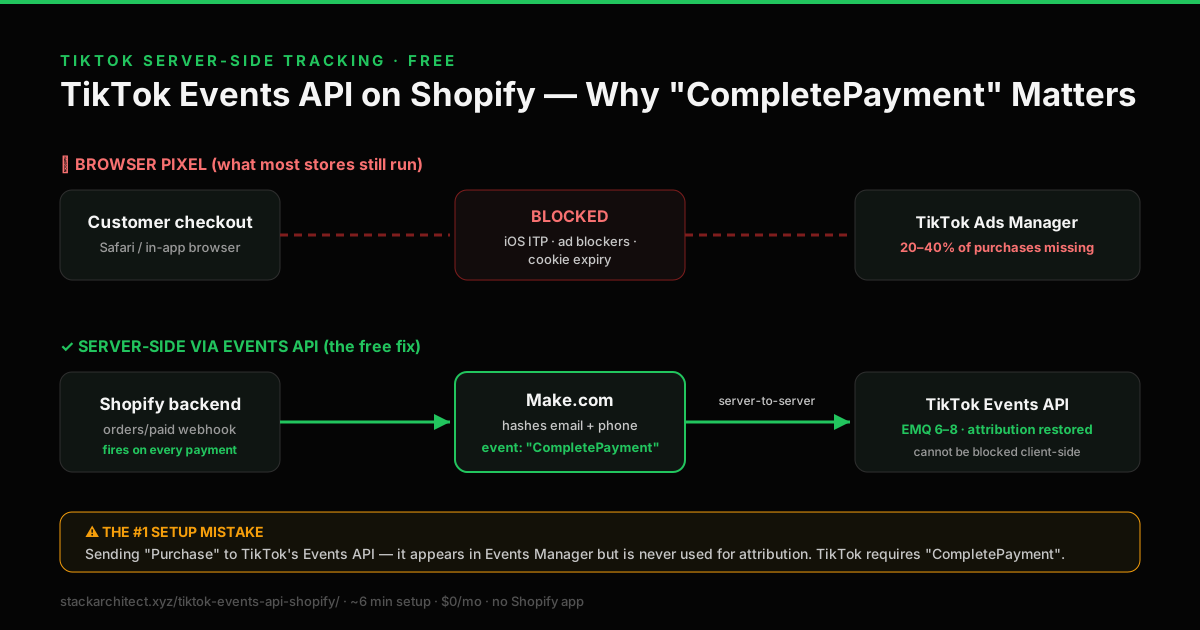
TikTok Events API architecture diagram

TikTok Events API for Shopify flow diagram 2026: browser pixel path blocked by iOS and ad blockers versus server-side path: Shopify orders/paid webhook to Make.com sending a CompletePayment event to TikTok Events API with full Advanced Matching data
Why conversions vanish and how the server-side path restores them: note the event name TikTok actually requires: CompletePayment, not Purchase.
Read this first

The TikTok pixel mode warning that will save you hours

One critical limitation almost no guide mentions before you build your server-side setup.

Critical: pixel modes cannot be changed

If you created your TikTok Pixel in standard mode, you cannot switch it to developer mode later. TikTok does not allow pixel mode changes after creation. If you need developer mode for custom event tracking, you must create a new pixel entirely. Check your pixel mode in TikTok Ads Manager before you begin.

What to do if you have a standard mode pixel

The Make.com webhook approach works with any pixel mode. You do not need developer mode to send server-side CompletePayment events via the Events API HTTP endpoint. Create a second pixel in developer mode only if you want custom event tracking. Run it alongside your existing pixel. TikTok can only deduplicate the browser and server events if both carry the same event_id. This setup uses the Shopify order ID. Shopify's TikTok app does not document the event_id its pixel sends, so do not assume they match: after a test order, check Test Events and Diagnostics in TikTok Events Manager for duplicate purchases.

The problem

Why your TikTok conversion data is wrong in 2026

The TikTok Pixel executes in the browser. In 2026, that browser is increasingly hostile to ad tracking.

When a customer buys from your Shopify store on an iPhone, Apple's Intelligent Tracking Prevention (ITP) and App Tracking Transparency (ATT) framework interfere with the JavaScript your TikTok Pixel uses to fire a CompletePayment event. A share of purchase events is either not fired at all, or fired without the customer identifier needed to attribute the sale back to the ad that drove it: how large a share depends on how much of your traffic is iOS and how much of it consents.

The TikTok algorithm uses these conversion signals to decide which users to show your ads to and how much to bid. When it receives only part of your actual purchases, it builds a model of your converting customer that is systematically wrong. It undervalues audiences that actually convert but whose conversions are invisible, and wastes budget on users who simply look like the ones it can see.

Measure it

We publish no average uplift figure. This callout previously carried one, attributed to TikTok with no URL and no date, which reads as sourced without being sourced. Any honest number is specific to your iOS traffic share, your consent rate and how complete your event payload already is. Get your own: record your attributed CompletePayment count for the fortnight before you deploy the Events API, and compare it with the fortnight after. That is a figure about your store, which is the only kind worth acting on.

Why TikTok's native CAPI has the same limitation as Meta

TikTok's own Shopify integration offers data sharing levels, and its higher levels send events server-side. For a store that only needs TikTok tracking, that may be enough, and it is the simplest route. Neither TikTok nor Shopify documents exactly what triggers each server event, so if you want a purchase signal that cannot depend on the browser, use the order webhook below. Use one server route for TikTok, not both, unless both send the same event ID.

The Make.com webhook approach takes the browser out of the purchase signal. The Shopify webhook fires from Shopify's server the moment payment is confirmed: completely independent of what happens in any browser. No pixel, no JavaScript, no browser dependency. The same webhook also powers CAPI Shield for Meta: one Shopify webhook trigger feeds TikTok and Meta at once.

Same webhook: Meta too

If you also run Meta Ads, the same Make.com scenario can branch to Meta's Conversions API with a Router module, unless Shopify's Facebook & Instagram app already sends it. For Google Ads, turn on enhanced conversions in Shopify's Google & YouTube app instead. Each branch uses credits, so check your scenario history. Deploy CAPI Shield free →

How it works

Webhook-triggered. Server-to-TikTok. Browser cannot interfere.

The same mechanism as CAPI Shield: a Shopify server webhook, not a browser pixel.

Step 01
Order paid in Shopify
Customer completes checkout. Shopify marks the order paid in its backend: independent of what happens in the browser. iOS and ad blockers are irrelevant at this point.
Shopify backend
Step 02
Webhook fires instantly
Shopify sends the order data to Make.com the moment payment confirms. Server-to-server signal. Cannot be blocked by iOS, ad blockers, or any browser privacy setting.
Shopify → Make.com
Step 03
Data enriched and hashed
Make.com extracts order value, currency, and customer data. Email, phone, IP address, and user agent are hashed with SHA-256 for TikTok Advanced Matching.
Make.com HTTP module
Step 04
CompletePayment sent to TikTok
Purchase event delivered directly to TikTok Events API with full Advanced Matching data. Algorithm receives conversion data for every order, every time.
TikTok Events API
Event naming: critical detail

TikTok uses CompletePayment as the purchase event name, not "Purchase" like Meta and Google. Using the wrong event name in Make.com will result in events appearing in the wrong category in TikTok Events Manager and not contributing to campaign optimisation. This is the most common setup mistake.

Keep your TikTok Pixel running

TikTok officially recommends running Events API as a second channel alongside your existing Pixel, not instead of it. The Pixel captures upper-funnel events (ViewContent, AddToCart). Events API adds server-side CompletePayment on top. TikTok can only deduplicate the browser and server events if both carry the same event_id. This setup uses the Shopify order ID. Shopify's TikTok app does not document the event_id its pixel sends, so do not assume they match: after a test order, check Test Events and Diagnostics in TikTok Events Manager for duplicate purchases.

Deploy TikTok Events API free via Make.com

No code · One Shopify webhook · Runs on Make.com's free plan

Before you start

What you need before you start

Two things from TikTok Ads Manager. Both free to access.

Required 01
TikTok Pixel ID

In TikTok Ads Manager → Assets → Events → Web Events. Create or select your existing pixel. Copy the Pixel ID: a string of numbers like 7234567890123456789.

TikTok Ads Manager → Assets → Events
Required 02
Events API Access Token

On the same pixel page → Settings → Generate Access Token. Copy the token: this authenticates your Make.com requests. You must be Admin or Operator to generate it.

Pixel Settings → Generate Access Token
No TikTok Ads account yet?

Create a TikTok Business account free at ads.tiktok.com: no minimum spend required to access Events Manager. You only pay when you run ads. The Events API setup costs nothing regardless of ad spend level.

Setup guide

Deploy TikTok Events API: step by step

No developer required and no paid apps. Confirm every step with a test order in TikTok's Test Events before relying on it.

1
Activate Make.com free
Sign up for Make.com free: 1,000 credits/month (formerly called operations) at no cost. How many orders that covers depends on the credits one order uses in your scenario. No credit card required. This is your automation hub routing Shopify order data to TikTok.
make.com/en/register: free tier, no credit card
2
Import the TikTok Events API scenario
One click imports the pre-built scenario into your Make.com workspace. The Webhooks trigger and HTTP module are already configured: no building from scratch, no technical knowledge needed. Once imported, open the Webhooks module and copy the generated webhook URL for Step 3.
Import TikTok Events API scenario →
3
Add Shopify webhook for order payment
In Shopify Admin → Settings → Notifications → Webhooks, create a new webhook. Select Order payment as the event. Paste your Make.com webhook URL as the destination. Set format to JSON and save. This is the server-to-server trigger: entirely independent of the browser.
Shopify Admin → Settings → Notifications → Webhooks
4
Add your Pixel ID and Access Token
In the imported scenario, open the HTTP module. Paste your Access Token into the Access-Token header, and replace YOUR_PIXEL_ID in the body's event_source_id field with your TikTok Pixel ID. Keep the quotes around the pixel ID so the body stays valid JSON.
Make.com → HTTP module
5
Test in TikTok Events Manager
Place a test order in your Shopify store. In TikTok Ads Manager → Assets → Events → your pixel → Test Events tab, verify a server-side CompletePayment event appears within 2–3 minutes. Check the Event Match Quality score and watch its trend.
TikTok Ads Manager → Assets → Events → Test Events
TikTok Events API request body: reference template for Make.com HTTP module
{
  "event_source": "web",
  "event_source_id": "YOUR_PIXEL_ID",
  "data": [
    {
      "event": "CompletePayment",
      "event_id": "{{1.id}}",
      "event_time": {{formatDate(1.created_at; "X")}},
      "properties": {
        "value": {{1.total_price}},
        "currency": "{{1.currency}}"
      },
      "user": {
        "email": "{{sha256(lower(trim(1.email)))}}",
        "phone": "{{if(1.phone; sha256(replace(1.phone; \" \"; \"\")); \"\")}}",
        "ip": "{{1.client_details.browser_ip}}",
        "user_agent": "{{1.client_details.user_agent}}"
      }
    }
  ]
}
Also running Meta or Google Ads?

For Meta, add a Router module to your Make.com scenario and branch to Meta’s Conversions API, unless Shopify’s Facebook & Instagram app already sends it. For Google Ads, turn on enhanced conversions in Shopify’s Google & YouTube app: no Make.com branch needed. Deploy CAPI Shield for Meta free →

Some links below are affiliate links (marked sponsored). They fund the free guides and never change a recommendation: our default pick on this page is a free tier. How we test & disclose →

Create a free Make.com account Add Meta CAPI too Import scenario free →
Comparison

Free TikTok Events API vs paid alternatives

The same server-side CompletePayment delivery, at $0 instead of $39–$275/month.

Feature Make.com Setup (Free) WeltPixel Analyzify Elevar TikTok
Monthly cost $0 forever $39/mo $145–$275/mo $225/mo
CompletePayment server-side Yes Yes Yes Yes
Advanced Matching (hashed PII) Yes: full Yes Yes Yes
Webhook-triggered (not browser) Yes Partial Partial Partial
Data in your own account Yes: Make.com Their servers Their servers Their servers
Also covers Meta Yes: same webhook Separate setup Separate setup Yes (paid)
Annual cost $0 $468 $1,740+ $2,700+
Common questions

TikTok Events API FAQ

Every question store owners ask before deploying.

How do I set up TikTok Events API on Shopify without code?

Create a Make.com scenario with a Webhook trigger, add an order-paid webhook in Shopify Admin pointing to your Make.com URL, then configure an HTTP POST in Make.com to send a CompletePayment event to TikTok's Events API endpoint with your access token. No code is required, and it runs on Make.com's free tier.

What is TikTok Events API for Shopify?

TikTok Events API is a server-to-server connection that sends Shopify purchase events directly to TikTok without going through the browser. This bypasses iOS ITP, ad blockers, and privacy settings that interfere with the browser Pixel. The free Make.com setup sends CompletePayment events with full Advanced Matching data.

How to set up TikTok Events API for Shopify free?

Sign up for Make.com free, import the pre-built TikTok Events API scenario with one click, add a Shopify Order Payment webhook pointing to your Make.com URL, enter your Pixel ID and Access Token in the HTTP module, then test with a sample order in TikTok's Test Events. No code is required, and it runs on Make.com's free tier.

What is the TikTok purchase event name?

TikTok uses CompletePayment as the purchase event name, not Purchase like Meta and Google. Using the wrong event name will result in events not contributing to campaign optimisation. Always use CompletePayment for TikTok purchase tracking.

Can I run TikTok Events API alongside my existing TikTok Pixel?

Yes: TikTok officially recommends running Events API alongside the browser Pixel, not instead of it. The Pixel captures upper-funnel events (ViewContent, AddToCart). Events API adds server-side CompletePayment on top. TikTok can only deduplicate the browser and server events if both carry the same event_id. This setup uses the Shopify order ID. Shopify's TikTok app does not document the event_id its pixel sends, so do not assume they match: after a test order, check Test Events and Diagnostics in TikTok Events Manager for duplicate purchases.

Does this replace WeltPixel or Analyzify?

Yes. WeltPixel charges $39/month on its Plus plan and Analyzify charges $145–$275/month for TikTok server-side tracking. The Make.com webhook approach achieves the same CompletePayment server-side delivery at $0/month on Make.com's free tier. The data flows through your own Make.com workspace rather than a third-party's servers.

What is TikTok Advanced Matching?

TikTok Advanced Matching sends hashed customer data (email, phone number, IP address, and user agent) alongside purchase events to improve event matching accuracy and EMQ scores. The Make.com setup hashes all available Shopify order fields with SHA-256 before transmission, as required by TikTok's API specification.

What EMQ score will I achieve?

We have not sampled EMQ across Shopify stores, so we do not publish a typical score for this setup: what we can say is that it sends full Advanced Matching data, which is what the score is calculated from. EMQ measures how well TikTok can match server-side events to TikTok user accounts. Including hashed email and phone, plus IP and user agent, from the Shopify order webhook gives TikTok the most to match on; read your own score in Events Manager after a week of orders.

Can I set up TikTok and Meta CAPI from the same Make.com scenario?

Yes. Add a Router module to the same scenario and branch to Meta's Conversions API alongside TikTok. Skip the Meta branch if Shopify's Facebook & Instagram app already sends the Conversions API at Enhanced or Maximum data sharing, or Meta can receive each purchase twice. For Google Ads, turn on enhanced conversions in Shopify's Google & YouTube app instead of adding a branch.

Related guides
CAPI Shield: recover Meta conversion data free → Shopify server-side tracking: complete setup guide 2026 → Stocky Swap, the free Stocky replacement → Free TikTok Events API blueprint on GitHub →
Ready to deploy

Your TikTok algorithm
needs complete data.

Stop losing TikTok conversion data to iOS and ad blockers. Deploy server-side CompletePayment events free: no code, no paid apps.

Also add Meta CAPI Import scenario free →
Runs on Make.com's free tier No credit card required Reversible anytime

Related free tools

CAPI Shield: Fix Meta Ads Tracking Too Same MakeSaves $145–$650/mo com scenario also sends purchases to Meta CAPI Fix Google Ads Conversion Tracking: Free Add Google Ads Enhanced Conversions to the same webhookFree setup One setup covers all three platforms Stocky Swap: Replace Shopify Stocky Free Same webhook infrastructure replaces Stocky inventory management for freeSaves $49–$119/mo Analyzify Alternative: Free Comparison TikTok CAPI + CAPI Shield replaces Analyzify at $0 vs $145–$275/month vs $145–$275/mo

Sources & primary documentation

Every technical claim and price on this page can be verified against the official documentation:

Key facts, checked on the source

  • TikTok deduplicates a Pixel event and an Events API event only when both carry the same event name and the same event_id, and it matches duplicates within 48 hours of the first event. Source: TikTok Ads Help Center, About event deduplication, read .

How to cite this page: Sandelands, L. (2026). Stack Architect. Stack Architect. https://stackarchitect.xyz/tiktok-events-api-shopify/ These facts are published as open data under CC BY 4.0: key-facts.json. Found one out of date? How we check and correct.

Luke Sandelands
Written by Luke Sandelands
Founder, Stack Architect · Shopify Automation Specialist
Developer of StockLog and author of the open-source shopify-capi-validator npm package. Builds Shopify server-side tracking, Meta CAPI and Google Apps Script automations.
Full profile

Updated