Stocky shut down on 31 August 2026. See your replacement options Stocky closed 31 Aug: export window and replacements
Pricing verified: 25 September 2026

Free Meta server-side tracking/Updated October 2026/8 min read

CAPI Shield: Shopify purchases to Meta’s Conversions API, free on Make.com.

CAPI Shield is a free Make.com scenario that takes each paid Shopify order from a webhook and sends it to Meta's Conversions API as a Purchase event, so iOS, Safari and ad blockers cannot stop it. This page is the setup. If your Meta results dropped and you do not yet know why, start with the ROAS guide.

We publish no loss figure. Measure your own gap before and after.

Built and tested by Luke Sandelands. How we check.

The problem

Why your Shopify conversion data is broken in 2026

Browser-based pixels worked perfectly until 2021. Four years of privacy changes have made them unreliable for everyone.

When a customer buys from your Shopify store on an iPhone, Safari's Intelligent Tracking Prevention (ITP) and Apple's App Tracking Transparency (ATT) framework actively interfere with the JavaScript your Meta Pixel uses to fire a purchase event. By the time checkout completes, some conversion events have either not fired at all, or fired without the customer identifier needed to attribute the sale back to the correct ad campaign. How many is set by your own iOS share and consent rate, and your dashboards can show it.

The problem compounds beyond iOS. Ad blockers stop the pixel for the desktop visitors who run them. Users who close the browser tab before the thank-you page fully loads never fire the pixel. Cross-device journeys (someone who sees an ad on mobile and buys on desktop) break attribution chains entirely. Cookie expiry means returning customers who buy weeks after clicking an ad are invisible to your campaigns.

Why Shopify's built-in CAPI has a hidden limitation

Shopify offers its own Conversions API connection: in Shopify admin, open Sales channels → Facebook & Instagram → Settings → Data sharing settings. Shopify's help centre says the Enhanced and Maximum levels both use Meta's Conversions API as well as the pixel. For a store that only advertises on Meta, switching that on is the simplest free route, and it may be all you need.

Shopify does not document exactly what triggers each of its server events. CAPI Shield takes a different route: it is triggered by Shopify's order webhook, which fires from Shopify's backend when an order is paid and does not depend on anything happening in the browser. Choose it if you want that independence, want to control exactly which customer fields are sent, or want the same trigger to feed TikTok. Do not run both for Meta unless you have confirmed their event IDs match: two server routes sending the same purchase under different IDs are counted twice.

CAPI Shield fixes this at the root. Rather than relying on the browser to trigger the server event, CAPI Shield uses a Shopify webhook: a server-to-server signal that fires the moment an order is paid, entirely independent of what the customer's browser does. The same webhook simultaneously feeds TikTok's Events API if you advertise there, and your live P&L dashboard: one trigger, three platforms.

How it works

Webhook-triggered. Server-to-server. Browser cannot interfere.

CAPI Shield uses a Shopify webhook, not a browser pixel, to trigger every conversion event.

How CAPI Shield routes Shopify conversion data server-side A Shopify order webhook triggers a Make.com scenario that hashes customer data and forwards a server-side purchase event to Meta Conversions API, bypassing the browser pixel that iOS and ad blockers break. A TikTok Events API branch can be added from a separate blueprint. The Google Ads route needs a Google click ID that Shopify orders do not carry, so it does not match most orders. Browser pixel client-side event iOS · ad blockers · ITP Ad platforms some never arrive THE BROKEN PATH: BROWSER TRACKING CAPI SHIELD: THE SERVER-SIDE PATH 01 Shopify orders/paid webhook fires server-side HTTPS 02 Make.com scenario runs on the free tier Parse order payload SHA-256 hash PII Attach event_id → dedupe ROUTER parallel Meta Conversions API EMQ ↑ Google Ads click-conversion route needs gclid TikTok Events API · separate blueprint ROAS ↑ 03: RECOVERED, SERVER-TO-SERVER The browser never touches this path. Because events leave from Shopify's server, iOS Link Tracking Protection, ITP, and ad blockers cannot intercept them. $0 / month vs Elevar $150+ · Northbeam $300+
CAPI Shield data flow: Shopify webhook → Make.com (hash + dedupe) → Meta CAPI, server-to-server. TikTok is a separate blueprint; the Google route needs a click ID Shopify orders do not carry
Step 01
Order paid in Shopify
Customer completes checkout. Shopify marks the order as paid in its backend: completely independent of what happens in the browser.
Shopify backend
Step 02
Webhook fires instantly
Shopify sends a webhook to Make.com the moment payment is confirmed. No browser involved. Ad blockers and iOS restrictions cannot intercept this signal.
Shopify → Make.com
Step 03
Data enriched and hashed
Make.com extracts order value, currency, and customer identifiers. All PII is hashed with SHA-256 before transmission, as required by Meta's API specification.
Make.com processing
Step 04
Sent to Meta
The purchase event is delivered to Meta's Conversions API with the hashed customer fields attached, whatever happened in the shopper's browser.
Meta Conversions API
Deduplication: important

CAPI Shield sends the Shopify order ID as the event_id of every Purchase. Meta merges a browser event and a server event only when their event name and event ID match. Shopify's Facebook & Instagram app does not document the ID its browser Purchase uses, so check rather than assume: place a test order and look at the Purchase events in Events Manager. If one order shows two Purchases with different IDs, they are being counted twice; send the browser event with the same ID, or use one route only.

Deploy CAPI Shield: recover your missing conversions

Free via Make.com · Requires no code

See the deployment →
Both platforms

Meta CAPI, and what the Google branch needs

CAPI Shield recovers lost Meta purchase events. Its Google branch needs a Google click ID on the order, which Shopify does not provide, so it is not a Google fix as shipped. The upload method it uses is also being moved to Google's Data Manager API.

Meta Conversions API
Recover lost Meta purchase events
Meta CAPI sends Shopify purchase events server-to-server, bypassing iOS ITP, ad blockers, and Safari cookie restrictions. CAPI Shield sends hashed email, phone, name, and IP address with every event: the full customer signal set Meta needs for accurate attribution and Advantage+ optimisation.
5 match keys per event
Google Enhanced Conversions
Free Shopify Google Enhanced Conversions
Google Enhanced Conversions is Google's server-side equivalent: it sends hashed customer data alongside conversion events to improve Smart Bidding accuracy. CAPI Shield's Google branch uploads a click conversion keyed on a Google click ID, and Shopify's order data has no field for one, so as shipped it is not a working route to Enhanced Conversions. Google is also moving this upload method, offline click conversion import, out of the Google Ads API and into its Data Manager API, and Make's Google Ads module now warns that uploads may fail for developer tokens that have not recently sent click conversions. Its two consent fields must be set to match your own consent setup.
Needs a click ID Shopify does not provide

What is Google Enhanced Conversions for Shopify?

Google Enhanced Conversions supplements your standard conversion tags by sending hashed first-party customer data (email address, phone number, name) alongside the conversion event. Google uses this data to match conversions to Google accounts with greater accuracy, improving Smart Bidding, Performance Max, and Shopping campaign optimisation even when cookies and pixels are blocked.

Event Match Quality for Meta: how to maximise your score

Event Match Quality (EMQ) is Meta's 0–10 score for how well server-side events are matched to Meta user accounts. Meta does not publish a target score. The identifiers it can match on include:

  • Hashed email address: present on almost every Shopify order.
  • Hashed phone number: present when the customer enters a phone at checkout.
  • First and last name: usually present in Shopify order data.
  • IP address: the order's browser IP, where Shopify recorded one.
  • Click ID (the fbc parameter, built from fbclid): useful when present, but Shopify's order webhook does not include it, so a webhook-only setup usually sends none.

CAPI Shield maps all available Shopify order fields to Meta's customer information parameters automatically. That is a larger match-key set than Shopify's native CAPI integration sends, and EMQ rises with the number of parameters Meta can match. We have not benchmarked the two side by side, so this page does not put scores on either.

Common mistake

Do not run two server-side tools with different event IDs simultaneously. If you have CAPI Shield running and also use another tracking app, ensure they use the same event_id for deduplication. Running two tools with different event IDs causes double-counting that inflates reported conversions and degrades campaign performance.

Set up Meta CAPI free

One webhook · No code · Free on Make.com

See the combined setup →
Setup guide

Deploy CAPI Shield: step by step

No developer required. Works with any Shopify plan. Free forever.

1
Activate Make.com free
Sign up for Make.com free: 1,000 credits/month (formerly called operations) at no cost. How many orders that covers depends on the credits one order uses in your scenario; check a run in its history. No credit card required. Make.com is your automation hub connecting Shopify to Meta and Google.
make.com/en/register: free tier, no credit card
2
Create a new scenario with Webhooks trigger
In Make.com, create a new scenario. Add a Webhooks module as the trigger. Copy the generated webhook URL: you will paste this into Shopify in the next step.
Make.com → Create scenario → Webhooks
3
Add Shopify webhook for order payment
In Shopify Admin → Settings → Notifications → Webhooks, create a new webhook. Select \"Order payment\" as the event. Paste the Make.com webhook URL. Set format to JSON. Save. This is the server-to-server trigger: entirely independent of the browser.
Shopify Admin → Settings → Notifications → Webhooks
4
Add the Meta Conversions API call
Add an HTTP module posting to Meta's Conversions API. In the URL, paste your Pixel/Dataset ID and your Conversions API access token (Events Manager → Settings → Conversions API → Generate access token). The pre-built scenario already sends event_name Purchase, event_id = order.id for deduplication, and SHA-256 hashed email, phone, name, IP and user agent. The URL also names a Graph API version: Meta retires each version about two years after release, so check it against Meta's Graph API changelog and keep it current.
Make.com → HTTP module
5
Optional: add a Google Ads branch
Add a second branch to the same scenario using a Router module. Add the Google Ads module and select \"Create a conversion\". Map order value, currency, and hashed email. Be aware before relying on it: this Google Ads module uploads a click conversion keyed on a Google click ID (gclid), and Shopify's order data has no field for one, so most orders reach Google with nothing to match on. Google is also moving this upload method, offline click conversion import, out of the Google Ads API and into its Data Manager API, and Make's Google Ads module now warns that uploads may fail for developer tokens that have not recently sent click conversions. Its two consent fields must be set to match your own consent setup.
Make.com → Router → Google Ads
6
Test and verify
Place a test order. In Meta Events Manager → Test Events, verify a server Purchase event appears alongside the browser event: confirming deduplication is working. If you added the Google branch, open the run in Make and read the Google step's response rather than trusting the green tick.
Meta Events Manager → Test Events

Some links below are affiliate links (marked sponsored). They fund the free guides and never change a recommendation: our default pick on this page is a free tier. How we test & disclose →

Create a free Make.com account
Pre-built & ready to import

Skip the manual build. This exact scenario is published free: one webhook hashes the customer data once, then a Router sends the purchase to Meta Conversions API, with a second route for Google Ads. The Google route needs a Google click ID that Shopify orders do not carry, and uses an upload method Google is moving to its Data Manager API. Its two consent fields must be set to match your own consent setup. Clone it, paste your Meta Pixel ID + token, and you're live.

Clone the free scenario →
Validate your payload first

Before you go live, check your CAPI payload is correct: Meta won't warn you if an email is sent unhashed or a timestamp is wrong; the event just silently fails to match. Our free open-source CLI catches it in one command:

npx shopify-capi-validator --payload ./webhook.json

Check a payload before you send it with the Meta Conversions API payload validator. It runs the same checks in your browser.

View on GitHub →
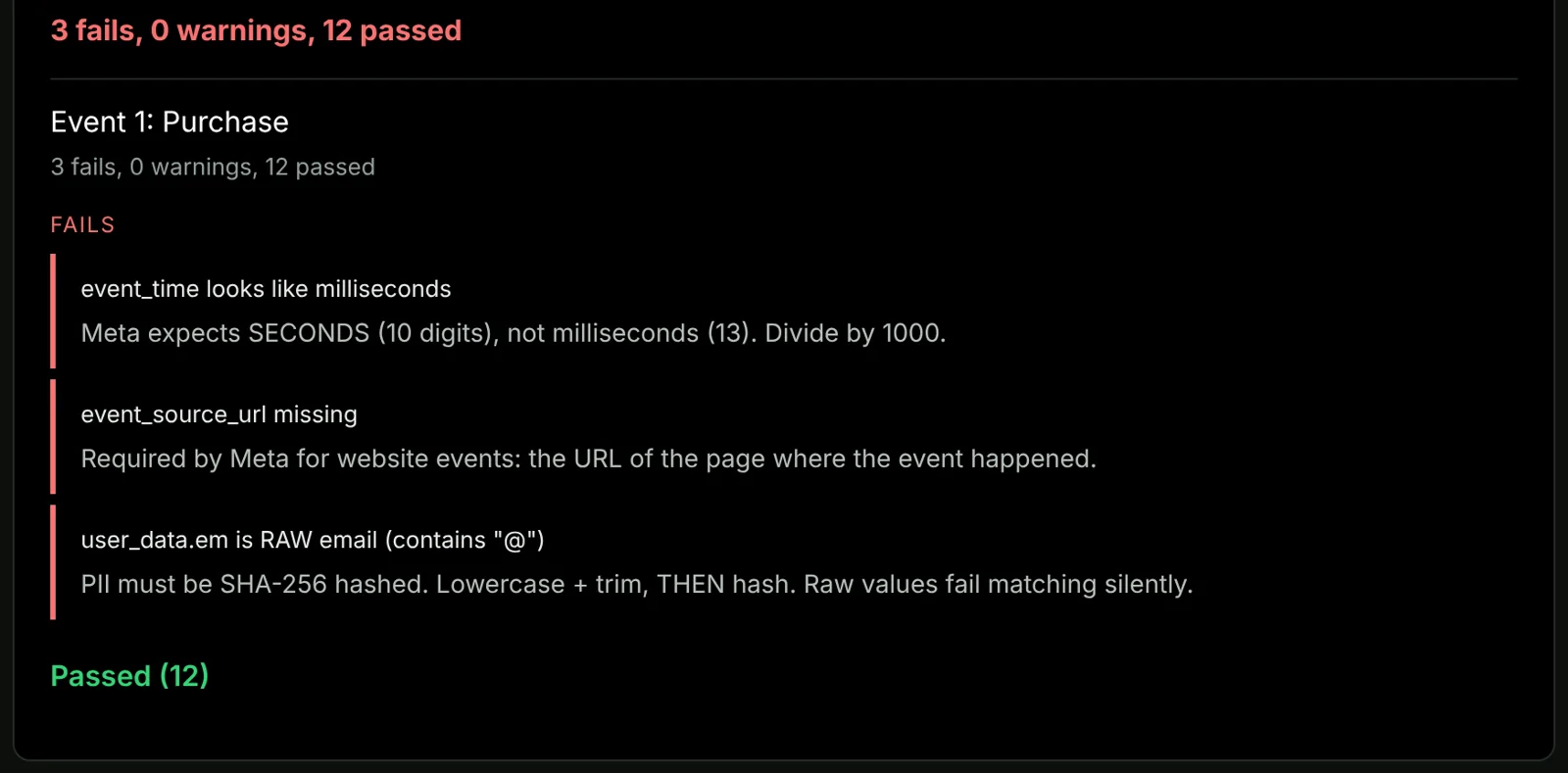
The payload validator on its example Purchase event: three fails (a millisecond timestamp, a missing event_source_url and a raw email address) and twelve passed checks.
The payload validator on its example Purchase event: three fails (a millisecond timestamp, a missing event_source_url and a raw email address) and twelve passed checks. Screenshot of the live tool, , on its example inputs. Run the Meta Conversions API payload validator with your own numbers
Download setup manual (PDF)
What it can and cannot do

What server-side events recover, and how to measure it on your store

A purchase sent from the server reaches Meta whether or not the browser pixel fired. That covers the purchases the pixel misses because iOS stripped the click ID, Safari cleared the cookie, or an ad blocker stopped the pixel loading. Without a click ID, Meta matches the event on the hashed customer details sent with it, such as email and phone.

No setup recovers a purchase that had no ad interaction behind it, or one where the customer opted out and left no details to match on. View-through attribution is a separate question from lost click tracking.

How much of your own gap closes depends on how much of it is browser-side loss, and that differs by store, so this page publishes no percentage. Meta measures it for you. Record Shopify orders against Meta-reported purchases for 30 days before you switch on server-side events, then read Meta's Additional Conversions Reported (ACR) figure in Events Manager once the new events have run for a few weeks. ACR is Meta's count of the conversions the Conversions API added on top of the Pixel, and the Dataset Quality API returns it alongside Event Match Quality.

Comparison

CAPI Shield vs paid alternatives

The same server-side purchase event forwarding, at $0 instead of $225/month for Elevar's Core plan.

Feature CAPI Shield Elevar Northbeam Triple Whale
Monthly cost $0 forever $225/mo From $1,500, by quote Priced by store revenue
Meta CAPI Yes Yes Yes Yes
Google Enhanced Conversions Needs click ID Yes Partial Limited
Webhook-triggered (not browser) Yes Partial Partial Partial
Data in your own account Yes: Make.com Their servers Their servers Their servers
Vendor lock-in None High High High
Annual cost $0 $2,700+ By quote Not published
Why competitors cost more

Elevar, Northbeam, and Triple Whale layer analytics dashboards and attribution modelling on top of the core CAPI connection. If you need those features, they may be worth the cost. If your primary goal is recovering lost Meta purchase data, CAPI Shield delivers that outcome at $0.

Common questions

CAPI Shield FAQ

Every question store owners ask before deploying.

What is the Shopify CAPI?

The Shopify CAPI refers to server-side Conversions API implementation for Shopify: sending purchase events from Shopify's servers to a platform's server API, such as Meta's Conversions API or TikTok's Events API, instead of relying only on a browser pixel. Ad blockers and browser privacy limits cannot stop a server event from being sent. For Google Ads, the free route for most stores is enhanced conversions in Shopify's Google & YouTube app.

What is Shopify server-side tracking?

Server-side tracking sends Shopify conversion events directly from your server to ad platforms, bypassing the browser entirely. iOS restrictions, ad blockers, and cookie expiry cannot interfere. CAPI Shield implements this free via Make.com webhooks: the webhook fires from Shopify's backend the moment an order is paid, completely independent of browser behaviour.

How to set up Shopify server-side tracking free?

Use CAPI Shield: a free Make.com scenario that routes Shopify order webhooks to Meta Conversions API. Sign up for Make.com free, create a scenario with a Webhooks trigger, add the Meta Conversions API request, create a Shopify Order Payment webhook pointing to your Make.com URL, and test with a sample order. no code required, free forever on Make.com's free tier.

What is Google Enhanced Conversions and how does it work with Shopify?

Google Enhanced Conversions is Google's server-side conversion tracking system. It supplements your standard Google Ads conversion tags by sending hashed first-party customer data (email, phone, name) alongside each conversion event. Google uses this to match conversions to Google accounts with greater accuracy, improving Smart Bidding and Performance Max optimisation even when cookies and pixels are blocked by iOS or ad blockers. CAPI Shield's Google branch is not a working route to it as shipped: it uploads a click conversion keyed on a Google click ID, and Shopify's order data has no field for one. Google is also moving this upload method, offline click conversion import, out of the Google Ads API and into its Data Manager API, and Make's Google Ads module now warns that uploads may fail for developer tokens that have not recently sent click conversions. Its two consent fields must be set to match your own consent setup.

What is Meta CAPI and how does it work with Shopify?

Meta Conversions API (CAPI) is a server-to-server connection that sends Shopify purchase events directly to Meta without going through the browser. CAPI Shield sets this up free using Make.com, sending hashed email, phone, name, IP and user-agent with every event: the match-key set Meta scores Event Match Quality against, and a larger one than the browser pixel carries.

How much conversion data am I losing without server-side tracking?

We do not publish a number, because the honest answer is specific to your store: the loss is driven by how much of your traffic is mobile and iOS, and how many of those visitors decline tracking. Measure yours instead. The Shopify vs Meta Attribution Gap Calculator turns your Ads Manager conversion count and your Shopify order count into your own gap; the Meta EMQ Score Estimator scores the match quality of what you are currently sending; and the Shopify iOS Attribution Gap Benchmark publishes the sourced figures behind the mechanism. After CAPI Shield deployment most stores see an immediate increase in reported conversions in Meta Events Manager within 24–48 hours.

Does CAPI Shield replace my Meta Pixel?

No. CAPI Shield works alongside your existing Meta Pixel, not instead of it. The pixel still captures upper-funnel events like ViewContent and AddToCart. CAPI Shield adds server-side Purchase events on top. Both fire simultaneously and Meta deduplicates them automatically using the event_id included in every server event.

What is the difference between CAPI Shield and Elevar or Northbeam?

Elevar's Core plan is $225/month, and Northbeam lists its Starter plan at $1,500 with every plan quoted through a sales call. CAPI Shield uses Make.com to achieve the same server-side event forwarding for free. The core technical outcome, server-side purchase events reaching Meta CAPI, is identical. Elevar and Northbeam add analytics dashboards on top. If you only need conversion recovery, CAPI Shield is the free equivalent.

Will CAPI Shield improve my ROAS?

Indirectly, yes. CAPI Shield gives Meta complete purchase data. Advantage+ Shopping uses conversion signals to optimise delivery. Most stores see measurable ROAS improvement within 14–21 days as the algorithm relearns with full data.

What is Event Match Quality and why does it matter?

Event Match Quality (EMQ) is Meta's 0–10 score for how well server-side events are matched to Meta user accounts. CAPI Shield sends hashed email, phone, name, IP and user-agent with every event. More match keys give Meta more to match on, which is what the score measures. We have not sampled EMQ across stores, so we do not publish a typical score: the EMQ estimator projects a range from your own parameter set.

Is CAPI Shield GDPR compliant?

The data flows through your own Make.com workspace. CAPI Shield hashes all personally identifiable information (email, phone, name) before transmission using SHA-256, as required by Meta's Conversions API specification. Ensure your store's privacy policy covers server-side tracking data sharing.

How long does CAPI Shield setup take?

We have not timed it on a fresh account, so we do not quote a time. The work is importing the Make.com scenario, pasting your Meta dataset ID and access token, adding one Shopify webhook, and placing a test order to check it in Meta's Test Events. No developer, code or infrastructure is required.

Why is Shopify's built-in CAPI not enough?

It may be enough. Shopify's Facebook & Instagram app sends Conversions API events at its Enhanced and Maximum data sharing levels, and for a store that only advertises on Meta that is the simplest free route. Shopify does not document exactly what triggers each server event. CAPI Shield is triggered by Shopify's order webhook, which does not depend on the browser at all, and the same trigger can feed TikTok. Use one route for Meta, not both, unless you have confirmed in Events Manager that their event IDs match.

Does this work with TikTok Ads as well?

Yes. The same Make.com scenario can route events to Meta CAPI and TikTok Events API from one webhook. Most stores start with Meta, then add TikTok as a second branch if they advertise there: using the same webhook trigger, no additional Shopify setup required.

Which Graph API version does CAPI Shield use?

The Meta request names a Graph API version in its URL. Meta retires each version about two years after release, and requests to a retired version fail. Check the version in your scenario's URL against Meta's Graph API changelog and update it before it expires, then send one test order to confirm events still arrive.

What happens if I want to remove CAPI Shield?

Delete the Make.com scenario and the Shopify webhook. Nothing is installed on your Shopify store. Data stops flowing immediately. No residue, no lock-in, no cancellation fees.

Related guides
Shopify server-side tracking: complete setup guide 2026 → How to fix Shopify conversion tracking after iOS updates (2026) → Why Meta Ads show fewer purchases than Shopify → TikTok Events API Shopify setup guide 2026 →
Ready to deploy

Your ads can't optimise
what they can't see.

iOS and ad blockers cannot intercept a server-side event. CAPI Shield delivers your purchase signal to Meta server-to-server: free, no code.

See the full stack
Runs on Make.com's free tier No credit card required Reversible anytime

Related free tools

Fix Google Ads Conversion Tracking: Free Server-side Enhanced Conversions via MakeFree setup com. Reports purchases lost to iOS iOS Attribution Gap Benchmark: Live Data How much Meta under-reports vs real Shopify orders, measured from real stores Add yours. First-party Attribution Gap Calculator: Your Numbers Enter Meta-reported vs actual Shopify orders to see your own tracking-loss percentage Free tool TikTok Events API: Free Server-Side Tracking Add TikTok as a third branch on the same MakeSaves $39–$275/mo com webhook. No extra Shopify setup Stocky Swap: Replace Shopify Stocky Free Stocky closed 31 Aug 2026. Export still openSaves $49–$119/mo Free Google Sheets replacement
Elevar is now Audiense
The domain redirects, the pricing page carries both names. Current plans and overage rates, verified 8 August 2026.
Elevar Alternative: Free Comparison CAPI Shield vs Elevar: feature-by-feature See exactly what you save at $0. vs $225/mo for Elevar Core

Related guides and tools from Stack Architect.

How to recover lost Shopify conversions with CAPI Shield →TikTok Events API for Shopify →Shopify Google Ads conversion tracking →

Key facts, checked on the source

  • In Shopify’s Facebook & Instagram app, the Enhanced and Maximum customer data sharing levels both send events through Meta’s Conversions API as well as the Meta pixel; the Standard level uses the pixel only. Source: Shopify Help Center, Facebook data sharing, read .
  • Meta deduplicates a pixel event and a Conversions API event only when the event name and the event ID match, and it discards a repeat that arrives within 48 hours of the first. Source: Meta for Developers, Deduplicate Pixel and Server Events, read .
  • Meta’s Graph API v19.0 was available until 21 May 2026, so a Conversions API request still written against v19.0 is on a retired version; v26.0 was released on 29 July 2026. Source: Meta for Developers, Graph API Changelog, read .
  • Meta’s Conversions API requires email, phone, name, date of birth, gender, city, state, postcode and country to be SHA-256 hashed, with email trimmed and lowercased first, and requires client IP address, user agent, fbc and fbp to be sent unhashed. Source: Meta for Developers, Customer Information Parameters, read .
  • Meta’s Conversions API expects event_time as a Unix timestamp in seconds, and rejects the whole request if any event in it is more than 7 days old. Source: Meta for Developers, Server Event Parameters, read .
  • Meta’s Event Match Quality is a score out of 10, calculated from which customer information parameters your server sends, how good that information is, and how many events match a Meta account. Source: Meta for Developers, Dataset Quality API, read .

How to cite this page: Sandelands, L. (2026). Stack Architect. Stack Architect. https://stackarchitect.xyz/capi-shield/ These facts are published as open data under CC BY 4.0: key-facts.json. Found one out of date? How we check and correct.

Luke Sandelands
Written by Luke Sandelands
Founder, Stack Architect · Shopify Automation Specialist
Developer of StockLog and author of the open-source shopify-capi-validator npm package. Builds Shopify server-side tracking, Meta CAPI and Google Apps Script automations.
Full profile

Updated

Sources & primary documentation

Every technical claim and price on this page can be verified against the official documentation: