Google Apps Script · Quotas · 2026 Limits
Google Apps Script Quotas & Limits (2026): Every Error, Every Fix (Free)
| Limit | Consumer accounts (for example, gmail.com) | Google Workspace accounts |
|---|---|---|
| Script runtime | 6 min / execution | 6 min / execution |
| Triggers total runtime | 90 min / day | 6 hr / day |
| Triggers | 20 / user / script | 20 / user / script |
| Email recipients per day | 100 * / day | 1,500 * / day |
| URL Fetch calls | 20,000 / day | 100,000 / day |
Source: Google Apps Script quotas, checked 24 September 2026. * Google notes that additional limits apply for trial accounts.
Google Apps Script stops any single execution after six minutes, on consumer and Workspace accounts alike. Daily quotas depend on the account: triggers may run for 90 minutes a day on a consumer account and six hours on Workspace. No setting or support request raises them, which is why heavy Autocrat and Sheets automations eventually fail.
Some links below are affiliate links (marked sponsored). They fund the free
guides and never change a recommendation: our default pick on this page is a free tier.
How we test & disclose →
You have hit a quota limit. Here is exactly which one and how to fix it: free, no upgrade required, works at any order volume.
Quick answer. The numbers that matter in 2026: Both consumer (free) and Google Workspace accounts get a 6-minute maximum execution time per script run: the old 30-minute Workspace limit no longer applies. Consumer accounts are capped at 90 minutes of trigger runtime per day; Workspace accounts get 6 hours of trigger runtime per day. UrlFetch calls are capped at 20,000 per day on consumer accounts (100,000 on Workspace). These are the hard limits that cannot be increased: they are why Autocrat, Sheets automations, and document workflows fail at scale. Figures verified against Google's official Apps Script quota documentation.
If you have ever seen “Service invoked too many times”, “Exceeded maximum execution time”, or “Could not obtain lock”, you already know the symptom. This guide explains the exact numbers behind those errors, when they appear by account type, and what actually works when order or document volume gets serious.
Shopify Stocky closed on 31 August 2026. The free replacement, Stocky Swap, logs every order to Google Sheets via Make.com, bypassing Apps Script quota limits entirely. Deploys without code. Don't wait until August.
What Are Google Apps Script Quotas?
Google Apps Script quotas are hard limits on how much work a script can do. They exist to protect shared infrastructure: stopping one workflow from consuming resources that affect thousands of other users. Quotas appear across four layers, and they all apply simultaneously:
- User-level quotas: tied to the Google account running the script. Consumer and Workspace accounts have different ceilings.
- Project-level quotas: tied to the Apps Script project itself. Concurrent executions are capped here.
- Service quotas: Gmail, Sheets, Drive, UrlFetch, and other services each have their own daily limit.
- Execution quotas: limits on how long a single run can take and how much total runtime is consumed in a day.
The critical point is that these limits stack independently. A workflow can be fine on execution time but fail on service call rate, which is why the same script can work perfectly for a small operation and break as soon as volume rises.
The Exact Google Apps Script Quota Limits in 2026
These are the official limits as of April 2026. Google does not announce changes widely: they update the quotas page without notice, which is why searches for “quotas 2026” are so common.
A single script run on a free Google account is hard-stopped after 6 minutes. This is the most common cause of incomplete document generation and partial Sheets processing.
Workspace accounts are held to the same 6-minute per-execution ceiling as consumer accounts. The 30-minute limit some older guides cite was retired: there is no longer any per-execution headroom from upgrading to Workspace.
Total combined runtime of trigger-driven executions per day on a free account. Once exhausted, triggered scripts stop until the quota resets 24 hours after the first request. Manual runs are not counted against this cap.
Google Workspace accounts get 6 hours of trigger runtime per day. Sufficient for most high-volume automation stacks, though not unlimited.
Hits this ceiling faster than expected when automations check external APIs (Shopify webhooks, tracking endpoints, third-party services) on every order. Moving conversion tracking server-side with CAPI Shield removes those per-order tracking calls from the quota count entirely.
Five times more headroom. Still a per-day hard limit. Burst usage in the first hour can exhaust this before the day ends.
Calls to Google Docs or Drive in any rolling 60-second window. Autocrat-style workflows that open, fill, and save documents hit this quickly on medium batches.
Per Google's documentation, quotas are per user and reset 24 hours after the first request: a rolling window, not a fixed midnight cutoff. Workflows that fail late may recover roughly a day later.
Upgrading to Workspace does not raise the 6-minute per-execution ceiling: that is identical on both account types. What Workspace does raise is the daily headroom: trigger runtime (90 min → 6 hr), UrlFetch calls (20,000 → 100,000), and email recipients (100 → 1,500). If your Shopify order volume is hitting those daily caps, the upgrade decision (trigger point and $21/month cost calculation) is covered in our Upgrade Guide.
| Quota Type | Consumer (free) | Google Workspace | Resets |
|---|---|---|---|
| Single execution time | 6 minutes | 6 minutes | Per run |
| Trigger runtime/day | 90 minutes | 6 hours | 24h rolling |
| UrlFetch calls/day | 20,000 | 100,000 | 24h rolling |
| Document creates/day | 250 | 1,500 | 24h rolling |
| Email recipients/day | 100 | 1,500 | 24h rolling |
| Concurrent executions | 30 | 30 | Per moment |
| Script properties size | 500KB | 500KB | Persistent |
Every Google Apps Script Quota and Limitation (2026): Complete Table
The seven figures above are the ones that break automations. Google publishes 22 daily quotas and 18 fixed limitations in total, and the rarer ones (Slides created, JDBC failed connections, URL Fetch header size) are exactly the ones nobody can find when a script starts failing. Here is the complete set, both account types, nothing omitted.
Verified 24 September 2026 against Google Apps Script: Quotas for Google Services. Google does not version that page, so the check date is the only provenance available; these are re-verified quarterly and every change is logged at the foot of this section.
Daily quotas: reset on a 24-hour rolling window
| Feature | Consumer (free) | Google Workspace |
|---|---|---|
| Calendar events created | 5,000 / day | 10,000 / day |
| Contacts created | 1,000 / day | 2,000 / day |
| Documents created | 250 / day | 1,500 / day |
| Files converted | 2,000 / day | 4,000 / day |
| Email recipients per day | 100 / day | 1,500 / day |
| Email recipients per day, within domain | 100 / day | 2,000 / day |
| Email read/write (excluding send) | 20,000 / day | 50,000 / day |
| Groups read | 2,000 / day | 10,000 / day |
| JDBC connection | 10,000 / day | 50,000 / day |
| JDBC failed connection | 100 / day | 500 / day |
| Presentations created | 250 / day | 1,500 / day |
| Properties read/write | 50,000 / day | 500,000 / day |
| Slides created | 250 / day | 1,500 / day |
| Spreadsheets created | 250 / day | 3,200 / day |
| Triggers total runtime | 90 min / day | 6 hr / day |
| URL Fetch calls | 20,000 / day | 100,000 / day |
| Static Map render | 1,000 / day | 10,000 / day |
| Google Map Direction query | 1,000 / day | 10,000 / day |
| Google Map Geocode calls | 1,000 / day | 10,000 / day |
| Google Map elevation samples query | 1,000 / day | 10,000 / day |
| Translate calls | 5,000 / day | 20,000 / day |
| Apps Script projects | 50 / day | 50 / day |
Hard limitations: fixed, and identical on both account types unless stated
| Feature | Consumer (free) | Google Workspace |
|---|---|---|
| Script runtime | 6 min / execution | 6 min / execution |
| Custom function runtime | 30 sec / execution | 30 sec / execution |
| Google Workspace add-on runtime | 30 sec / execution | 30 sec / execution |
| Simultaneous executions per user | 30 / user | 30 / user |
| Simultaneous executions per script | 1,000 | 1,000 |
| Email attachments | 250 / msg | 250 / msg |
| Email body size | 200 KB / msg | 400 KB / msg |
| Email recipients per message | 50 / msg | 50 / msg |
| Email total attachments size | 25 MB / msg | 25 MB / msg |
| Properties value size | 9 KB / val | 9 KB / val |
| Properties total storage | 500 KB / property store | 500 KB / property store |
| Triggers | 20 / user / script | 20 / user / script |
| URL Fetch response size | 50 MB / call | 50 MB / call |
| URL Fetch headers | 100 / call | 100 / call |
| URL Fetch header size | 8 KB / call | 8 KB / call |
| URL Fetch POST size | 50 MB / call | 50 MB / call |
| URL Fetch URL length | 2 KB / call | 2 KB / call |
| Versions | 200 / script | 200 / script |
Custom functions have their own 30-second limit and errors; see Google Sheets custom function errors.
Two things worth noticing in the complete set. Only three limitations differ between account types at all: email body size, and the two email-recipient quotas. Everything else in the limitations table is identical whether you pay Google or not, which is why “upgrade to Workspace” is such poor advice for a script that is timing out. And document, presentation and slide creation all share the same 250/day consumer ceiling: if one workflow generates all three, they do not pool, but they do fail on the same day.
2026-09-24: Every row compared with Google's live quotas page, dated 3 September 2026 UTC by Google: no differences. The five limits most scripts hit now also appear in a table directly under the page heading.
2026-08-23: Full table transcribed from Google's official documentation: 22 daily quotas and 18 hard limitations. All figures re-verified; the five previously published on this page (6-minute runtime, 90 min / 6 hr trigger runtime, 20,000 / 100,000 URL Fetch, 250 / 1,500 documents, 100 / 1,500 email recipients) were all correct.
These figures are also published as open data, checked against Google's page daily, in the apps-script-quotas package (github.com/lsb11/apps-script-quotas), with a dated changelog of every change Google makes.
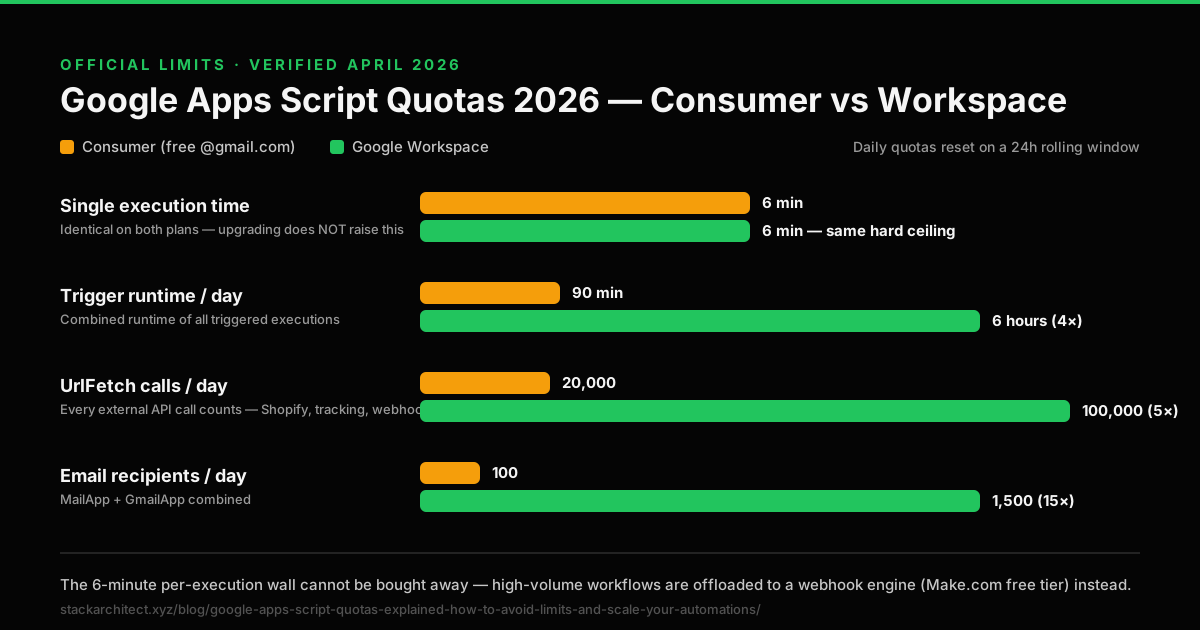
Apps Script quotas are set per Google account type and enforced by Google. No request or setting raises them; a Workspace account has higher daily quotas than a consumer account, but the same six-minute runtime. Batching, backoff, and staggered triggers (covered below) reduce how often you hit the ceiling; they do not move it. The structural fix is running the work somewhere the ceiling doesn't apply. The Make.com guide for scaling Shopify automation past Apps Script's quota limits covers the same pattern used in the Autocrat fix below, applied to order sync, inventory, and email workflows.
Why Quota Limits Break Your Automations
Quota failures are rarely random. They follow predictable patterns based on four root causes:
- Burst processing: too many reads, writes, or document operations concentrated in one short window.
- Trigger overlap: multiple time-based or event-based triggers fire before the previous execution finishes.
- Large batch size: one job attempts to process more rows than a single 6-minute execution can handle.
- Hidden retry loops: failed executions trigger automatic retries, accelerating the failure spiral.
Light use
Simple scripts under 100 rows/day usually stay inside quota with basic monitoring.
Growing use
Once volume scales past a few hundred rows per day, batching and timing become essential.
High volume
When the workflow is mission-critical and volume is unpredictable, shared Apps Script limits are the wrong architecture.
Common Quota Errors and What They Mean
Each error message maps to a specific quota breach. Knowing which limit you hit tells you which fix applies.
| Error Message | Quota Breached | Immediate Cause |
|---|---|---|
| Service invoked too many times | Service call rate | Too many calls to Sheets, Docs, Drive, or Gmail in a short window |
| Exceeded maximum execution time | 6-min execution ceiling | Single run took longer than 6 minutes: script hard-stopped mid-execution |
| Could not obtain lock | Concurrent execution | Two runs tried to access the same resource simultaneously |
| Quota exceeded | Daily service limit | UrlFetch, document creates, or email sends hit the daily cap |
| Daily limit for sending email exceeded | 100/day consumer cap | Email sends exhausted before end of day |
Apps Script error explainer
Fixing “Service invoked too many times”
This one is a rate limit, not a daily quota. The script called Sheets, Docs, Drive or Gmail too many times in a short window, so slowing it down or making fewer calls clears it without waiting for any reset. Google does not publish a per-minute figure for most services, so treat the fixes below as ways to call less often, not as ways to stay under a known number.
The usual cause is a loop that touches the spreadsheet once per row. Three calls per row means 300 calls for 100 rows, fired as fast as the script can run:
// Triggers the error: one service call per cell, per row
function processOrders() {
  var sheet = SpreadsheetApp.getActiveSheet();
  for (var i = 2; i <= sheet.getLastRow(); i++) {
    var orderId = sheet.getRange(i, 1).getValue();
    var status  = sheet.getRange(i, 2).getValue();
    sheet.getRange(i, 3).setValue(processOrder(orderId, status));
  }
}
Read everything once, work on the array in memory, and write everything once. That is two service calls however many rows there are:
// Fixes it: one read, one write
function processOrders() {
  var sheet = SpreadsheetApp.getActiveSheet();
  var data = sheet.getRange(2, 1, sheet.getLastRow() - 1, 2).getValues();
  var results = data.map(function (row) {
    return [processOrder(row[0], row[1])];
  });
  sheet.getRange(2, 3, results.length, 1).setValues(results);
}
Some calls cannot be batched, such as creating one Google Doc per row. For those, retry with a growing delay, and only for this error:
function callWithBackoff(fn) {
  var delay = 1000;
  for (var attempt = 1; attempt <= 5; attempt++) {
    try {
      return fn();
    } catch (e) {
      if (e.message.indexOf('Service invoked too many times') === -1 || attempt === 5) throw e;
      Utilities.sleep(delay);
      delay *= 2;
    }
  }
}
Backoff turns a failure into a slower success. It does not fix a script that trips the error on every run; that script needs batching. A script that retries quietly can also use up its daily runtime and still look as if it ran, so pair it with a failure alert you will actually see.
| What you see | Likely cause | Fix |
|---|---|---|
| Fails partway through a loop | One service call per row | Batch reads and writes |
| Fails now and then, not every run | A short burst of calls | Backoff and retry |
| Fails when two triggers fire together | Two runs competing | Offset the triggers by a few minutes |
| Fails under many form submissions at once | Parallel runs of the same script | LockService, as in the batch pattern below |
| Still fails after batching, at high document volume | The workload is too big for Apps Script | Move it to Make.com (see the Autocrat section below) |
If your quota errors are tied to Shopify order volume (particularly inventory sync or order logging workflows) the Stocky Swap free replacement routes every order through Make.com directly to Google Sheets, bypassing Apps Script execution entirely. No quota ceiling, no 6-minute limit, no document create cap. Deploy free in 4 minutes →
Will Your Script Hit a Quota? Work Out Which Ceiling Binds First
Google publishes the limits. It does not tell you whether your script is going to reach them, and that is the only question that matters at 2am when a batch dies halfway through. Three ceilings can stop an Apps Script job and they bind in different orders depending on what the script does. This works out which one you reach first.
You reach the 6-minute execution ceiling first, at 83% of it. At 3 calls per row and 200ms per call, one execution fits about 600 rows before the 6-minute wall. You are processing 500, so there is roughly 100 rows of headroom: one busy week of growth. When it goes, it goes mid-batch: rows before the cutoff are written, rows after it are not, and nothing tells you which.
Ceilings are exact, from the verified table above. Latency is the estimate: a Sheets call is
typically 150–300ms, but it depends on sheet size and network, so measure yours with
console.time() and put the real number in. The arithmetic is
rows × calls × latency; nothing is hidden.
How to Stay Under Quotas Without Breaking Your Workflow
These six techniques reduce quota pressure and can sustain most medium-volume automations on consumer accounts. They are mitigation strategies: not architectural solutions for serious scale.
- Batch smaller chunks: process 50–100 rows per run instead of everything at once.
- Reduce API calls aggressively: cache sheet values at the start using
getValues()once, operate on the array in memory, then write back with a singlesetValues()call. - Stagger triggers: separate time-based triggers by at least 5–10 minutes to prevent overlapping executions.
- Persist state with PropertiesService: save progress checkpoints so a timed-out script can resume from where it stopped.
- Add exponential backoff: when a service call fails, wait and retry with increasing delays.
- Use LockService deliberately: acquire a lock at the start of any execution that touches shared data.
Batching and backoff can take a stable 100-row workflow and scale it to 500 rows. They cannot take a 500-row workflow to 5,000 rows. At that point, the daily trigger-runtime ceiling is the binding constraint, and no code optimisation changes a 90-minute daily limit.
The Resumable Batch Pattern: Working Code That Survives the 6-Minute Wall
Everything above reduces how often you hit the ceiling. This is the pattern that makes hitting it survivable: the script processes what it can inside a time budget, writes down where it got to, schedules itself to continue, and picks up from the same row on the next run. A job that needs forty minutes finishes across nine executions instead of dying at six.
Most published versions of this leak triggers. They create a new one-shot trigger on every resume without deleting the one that just fired, and because a script is capped at 20 triggers (see the limitations table above), a long job kills itself with “This script has too many triggers” around the twentieth chunk. The version below deletes its own triggers before creating the next, holds a lock so two chunks can never run at once, and bounds its retries so a permanent error cannot loop until the daily quota is gone.
runResumableBatch once const HANDLER = 'runResumableBatch'; // must equal this function's name
const CURSOR_KEY = 'batch_cursor';
const RETRY_KEY = 'batch_retries';
const TIME_BUDGET_MS = 4.5 * 60 * 1000; // stop at 4:30 of the 6:00 ceiling
const CHUNK_ROWS = 200; // rows per read/write pair
const MAX_RETRIES = 3;
function runResumableBatch() {
const started = Date.now();
const props = PropertiesService.getScriptProperties();
// Never let two chunks run at once. tryLock, not waitLock: a queued chunk
// would burn its own execution time sitting in the queue.
const lock = LockService.getScriptLock();
if (!lock.tryLock(5000)) {
console.log('Another chunk holds the lock. Exiting.');
return;
}
try {
// Delete the one-shot trigger that fired this run, plus any strays. A
// time-based trigger created with .after() is NOT removed automatically.
clearOwnTriggers_();
const sheet = SpreadsheetApp.getActiveSpreadsheet().getSheetByName('Orders');
const lastRow = sheet.getLastRow();
let cursor = Number(props.getProperty(CURSOR_KEY) || 2); // row 1 = headers
while (cursor <= lastRow) {
// Check the clock BEFORE starting a chunk, never during. A chunk that
// starts must be allowed to finish, or its rows are read and not written.
if (Date.now() - started > TIME_BUDGET_MS) {
props.setProperty(CURSOR_KEY, String(cursor));
scheduleNextChunk_();
console.log('Budget reached at row ' + cursor + '. Next chunk scheduled.');
return;
}
const rows = Math.min(CHUNK_ROWS, lastRow - cursor + 1);
const values = sheet.getRange(cursor, 1, rows, 3).getValues(); // ONE read
const output = values.map(processRow_);
sheet.getRange(cursor, 4, output.length, 1).setValues(output); // ONE write
cursor += rows;
props.setProperty(CURSOR_KEY, String(cursor)); // checkpoint after the write
}
props.deleteProperty(CURSOR_KEY);
props.deleteProperty(RETRY_KEY);
console.log('Finished at row ' + (cursor - 1) + '.');
} catch (err) {
// A thrown error must not strand the batch halfway. Reschedule, but bound
// it, or a permanent failure retries until the daily runtime quota is gone.
const attempts = Number(props.getProperty(RETRY_KEY) || 0) + 1;
if (attempts <= MAX_RETRIES) {
props.setProperty(RETRY_KEY, String(attempts));
scheduleNextChunk_();
console.log('Chunk failed (attempt ' + attempts + '). Retry scheduled.');
} else {
props.deleteProperty(CURSOR_KEY);
props.deleteProperty(RETRY_KEY);
console.log('Giving up after ' + MAX_RETRIES + ' attempts. Cursor cleared.');
}
throw err; // still surface it, so the execution shows as failed
} finally {
lock.releaseLock();
}
}
// Your per-row work. Must return a one-cell array to match the setValues range.
function processRow_(row) {
return [row[0] + '-' + row[1]];
}
function clearOwnTriggers_() {
ScriptApp.getProjectTriggers()
.filter(function (t) { return t.getHandlerFunction() === HANDLER; })
.forEach(function (t) { ScriptApp.deleteTrigger(t); });
}
function scheduleNextChunk_() {
ScriptApp.newTrigger(HANDLER).timeBased().after(60 * 1000).create();
}Why each piece is there
TIME_BUDGET_MSis 4:30, not 6:00. The check happens between chunks, so the budget must leave room for the slowest possible chunk plus the checkpoint and the trigger call. Setting it at 5:50 means the run dies inside a chunk with rows read and not written.- The clock is checked before a chunk, never inside one. A chunk that has started must finish, or you get the exact partial-write failure the whole pattern exists to prevent.
tryLock, notwaitLock. A chunk that queues behind another spends its own six minutes waiting. Better to exit and let the scheduled trigger handle it.clearOwnTriggers_()runs first. One-shot.after()triggers persist after firing. Without this the script accumulates one per resume and stops at the 20-trigger cap: a quota failure caused by the fix for a quota failure.- The checkpoint is written after the
setValues, not before. Checkpoint first and a crash between the two loses the chunk silently; checkpoint after and the worst case is one chunk processed twice, which is recoverable. - Retries are bounded. An unbounded reschedule on a permanent error (a bad reference, a deleted sheet) will consume the entire 90-minute daily trigger allowance overnight and take every other automation on the account down with it.
It defeats the per-execution ceiling, not the daily one. Nine chunks of four and a half minutes is roughly 40 minutes of the 90-minute consumer trigger allowance: run that twice a day and there is nothing left for anything else on the account. Use the calculator above with your real numbers: if the daily bar is the one filling up, no amount of chunking helps and the work has to move off Apps Script entirely.
Autocrat · Document Automation · Quota Fix
Why Autocrat Specifically Hits Quota Limits, and the Structural Fix
Autocrat is one of the most popular document generation tools for Google Sheets, and one of the most quota-sensitive. If you are generating contracts, invoices, certificates, or any templated document from Sheets rows, you will hit quota limits earlier than almost any other Apps Script workflow.
Why Autocrat Is Quota-Intensive
Each Autocrat document generation triggers multiple service calls in sequence: it opens Google Drive, reads the template, creates a new document, writes merged data into it, converts to PDF if needed, saves to Drive, and optionally sends via Gmail. That is 5–8 service calls per row. At 30 document service calls per minute (consumer limit), Autocrat can reliably process around 4–5 documents per minute, or roughly 25–30 in a single run before the service rate limit triggers.
The Four Autocrat Quota Failure Patterns
- Mid-batch timeout: a run of 100+ rows hits the 6-minute ceiling. Documents for rows 1–40 generate correctly; rows 41–100 are skipped silently.
- Service rate throttling: rapid document creation trips the “Service invoked too many times” error mid-run.
- Trigger collision: high-frequency form submissions cause concurrent executions that fight for the same document lock.
- Daily cap exhaustion: at 250 document creates per day (consumer limit), a busy day exhausts the allowance before afternoon.
The Structural Fix: Move Document Generation Off Shared Scripts
The reliable solution is moving document generation off Google's shared execution environment entirely. Instead of Autocrat running inside Apps Script on Google's public quota pool, the workflow runs through a dedicated Make.com scenario that calls the Google Docs API directly via a private HTTP connection.
- Not bound by the six-minute Apps Script limit. Make.com's free plan has its own limit of five minutes per scenario run (Make.com pricing), but an order-triggered scenario handles one order per run, so a single run rarely comes near it.
- No shared service rate limits: Make.com calls the Google Docs API via OAuth, separate from the shared Apps Script consumer pool.
- No document create cap: the 250-documents-per-day consumer limit applies to Apps Script internal calls only.
The Autocrat Quota Fix product page has the Make.com scenario blueprint, step-by-step alignment instructions, and the deployment guide: no coding required, ready to import.
When You Have Outgrown Apps Script Entirely
The signal is usually obvious: document generation starts missing rows, order sync gets delayed, or the workflow behaves differently depending on the time of day. That last symptom, time-dependent behaviour, is the clearest sign of a daily quota problem.
- Trigger in Apps Script: lightweight event detection only
- Process in a dedicated execution layer: Make.com, a Cloud Function, or a dedicated API lane
- Write results back only after the heavy work is complete
Two upgrades, and which limit each one actually moves:
- A Google Workspace account raises the daily quotas: total trigger runtime goes from 90 minutes to 6 hours a day, and UrlFetch calls from 20,000 to 100,000. It does not change the 6-minute limit on a single execution, so it fixes a script that runs out of daily budget, not one that times out mid-run. Try Google Workspace.
- Moving the heavy step to Make.com takes it out of Apps Script's quotas: Make counts one credit per module operation rather than Apps Script runtime, and has execution limits of its own, so check them for a long job. Its free plan is enough to test the move. Create a free Make.com account.
Best Architecture for Scale
Keep lightweight logic close to the spreadsheet (change detection, simple calculations, notification sends) and move heavy lifting to a system built for throughput.
Apps Script detects the event. Make.com or a dedicated service does the processing. The result lands back in Sheets. This pattern removes the quota ceiling from every expensive operation. The Make.com for Shopify complete guide covers exactly how to set this up from scratch.
Frequently Asked Questions
What is the Google Apps Script execution time limit in 2026?
Both consumer (free) and Google Workspace accounts are capped at 6 minutes per execution in 2026: the 30-minute Workspace limit cited by older guides no longer applies. Scripts that exceed the limit are hard-stopped mid-run: no graceful shutdown, no warning, just termination.
What is the daily runtime limit for Google Apps Script in 2026?
Google's official quota for triggers total runtime is 90 minutes per day on consumer accounts and 6 hours per day on Workspace accounts. This applies to trigger-driven executions; manual runs are not counted. The quota resets 24 hours after the first request.
What is the Google Apps Script UrlFetch daily limit?
Consumer accounts can make 20,000 UrlFetch calls per day. Google Workspace accounts get 100,000 per day. If your automation calls external APIs on every order, this limit can be exhausted faster than expected on high-volume days.
Have Google Apps Script quotas changed for 2026?
The core limits, 6-minute execution (both consumer and Workspace) and 90-minute daily trigger runtime on consumer accounts, have remained consistent into 2026. Google does not announce quota changes prominently. If you are seeing new failures, it is more likely that your volume has grown into the limits rather than that Google has tightened them.
Can Google Apps Script quotas be increased?
Not by request or configuration. Google publishes one set of figures for consumer accounts and a higher set for Google Workspace accounts, so moving to Workspace raises the daily quotas, such as trigger runtime and URL Fetch calls. The six-minute limit per execution is the same on both. To work beyond it, move the work outside Apps Script, into Make.com or a dedicated API layer.
Why does my script work in the morning but fail in the afternoon?
This is the clearest sign of a daily quota problem. Trigger-driven automations are exhausting the 90-minute daily trigger runtime (consumer) in the first half of the day, leaving nothing for afternoon processing. The quota resets 24 hours after the first request, which is why timing shifts day to day.
Why does the same script work one day and fail the next?
Variable load. A day with higher order volume or more form submissions hits limits that a quieter day never reached. The script did not change: the pressure on its quota allowance did.
Is Apps Script still useful for automation in 2026?
Yes: as a lightweight trigger and orchestration layer for simple spreadsheet actions and low-volume workflows. It becomes a liability when it is the execution engine for mission-critical, high-volume processing. For those cases, Make.com is the right tool.
Final Takeaway
Google Apps Script quotas in 2026 are not a mystery once you know the numbers: 6 minutes per execution, 90 minutes per day, 20,000 UrlFetch calls on a consumer account. They are clear, fixed, and cannot be negotiated with. If your automation is stable, the limits are irrelevant. If your workflow is growing, the limits become the ceiling.
Key facts, checked on the source
- A Google Apps Script execution can run for at most 6 minutes on both consumer and Google Workspace accounts, and a custom function for at most 30 seconds. Source: Google for Developers, Quotas for Google Services, read .
- Google Apps Script allows 90 minutes of total trigger runtime and 20,000 URL Fetch calls a day on a consumer account, against 6 hours and 100,000 calls on a Google Workspace account. Source: Google for Developers, Quotas for Google Services, read .
How to cite this page: Sandelands, L. (2026). Stack Architect. Stack Architect. https://stackarchitect.xyz/blog/google-apps-script-quotas-explained-how-to-avoid-limits-and-scale-your-automations/ These facts are published as open data under CC BY 4.0: key-facts.json. Found one out of date? How we check and correct.

shopify-capi-validator npm package. Builds Shopify server-side tracking, Meta CAPI and Google Apps Script automations. Updated