Shopify Server-Side Tracking Setup
Meta, TikTok & Google: step by step
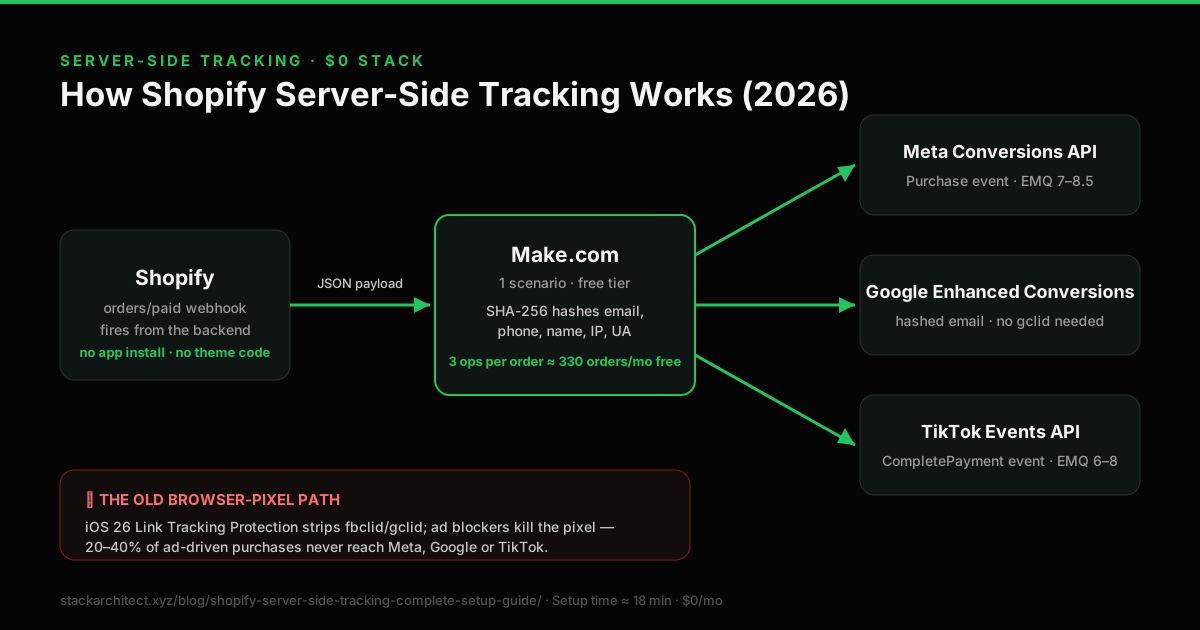
Shopify server-side tracking sends each paid order to the ad platforms from Shopify's servers, not the shopper's browser. A free Make.com scenario receives Shopify's order webhook, hashes the customer data and posts the purchase to Meta and TikTok. For Google Ads, turn on enhanced conversions in Shopify's Google & YouTube app instead.
The pieces, in each platform’s own words (checked 24 September 2026): Shopify sends the orders/paid webhook whenever an order is paid; Meta requires contact details to be normalised and SHA256-hashed; Google’s Enhanced Conversions sends SHA256-hashed first-party data alongside the conversion; and TikTok recommends running the Events API alongside its Pixel.
Shopify records every paid order; your ad platforms only count the purchases their tags or servers tell them about. The gap is not a reporting quirk you can annotate away: it is the training data each platform uses to decide who sees your ads next. Server-side events close the part of it the browser causes.
Only need Meta? See the Shopify server-side tracking setup guide.
Shopify Server-Side Tracking Explained in 60 Seconds
Shopify server-side tracking is a method of sending purchase events from Shopify’s backend to the ad platforms, instead of relying on a tag in the customer’s browser. Browser tags can be stopped by ad blockers, declined consent and browser privacy features, and a server-side event cannot. We publish no figure for how many purchases a browser tag misses: it depends on your own traffic and consent rate, so no industry range describes your store. Measure yours.
The mechanism is straightforward. When a Shopify order is paid, Shopify sends an orders/paid webhook to a Make.com scenario. The order data includes the customer’s email, phone, name and address, the order total and currency, and the IP address and user agent of the browser that placed the order. Make.com hashes the personal data with SHA-256 and posts a purchase event to Meta’s Conversions API and TikTok’s Events API. Google is different: Shopify’s order data has no Google click ID, so for most stores the free route is enhanced conversions in Shopify’s Google & YouTube app.
A server-side event carries match keys the browser tag may not have, and each platform’s match score is calculated from the keys present. We have not sampled scores before and after across stores, so we publish no figure for either side: read yours in each platform’s events manager.
Quick answer table
- What it is: Server-to-server transmission of conversion events, fired by Shopify webhooks instead of browser JavaScript.
- Why it’s needed in 2026: iOS App Tracking Transparency, Link Tracking Protection (iOS 17 and later, in Mail, Messages and Private Browsing), Safari’s cookie limits, ad blockers and declined consent all stop some browser tag events. How many is a property of your store.
- What it costs: $0/month using the Make.com webhook method. From $145/month using managed services (Analyzify, Triple Whale, Elevar).
- What it takes: one Shopify webhook and a two-module Make.com scenario, or a server-side Google Tag Manager container on Google Cloud if you need custom tag logic.
- What you need: Shopify Admin access, a Meta Conversions API access token, a TikTok Events API access token, a free Make.com account, and Shopify’s Google & YouTube app for Google Ads.
- What you should send:
Purchase(Meta) andCompletePayment(TikTok). Note: TikTok does not use “Purchase”. Sending it is the most common setup error. - What changes: events that browser tracking loses are delivered server-side instead, and each event carries more match keys. We have not measured the effect on reported conversions, EMQ or cost-per-purchase for any store, so this guide does not quote figures for them: you can read all three in your own Events Manager before and after.
What is Server Side Tagging (Shopify Server-Side Tracking)?
Server-side tracking (also called Conversions API, server-to-server tracking, or S2S tracking) sends conversion events directly from your web server to advertising platforms: completely bypassing the customer’s browser. Instead of relying on a JavaScript pixel in the browser to fire when a purchase completes, a webhook fires from Shopify’s backend when payment is confirmed, and an automation posts the purchase to the platform’s server API, such as Meta’s Conversions API or TikTok’s Events API.
The key distinction is where the event originates. A browser pixel depends on the customer’s device: their browser settings, installed extensions, network conditions, and whether they accepted your cookie banner. A server event originates from Shopify’s infrastructure, so ad blockers, iOS privacy restrictions and Safari’s Intelligent Tracking Prevention cannot stop it from being sent. Whether the platform can match it to an ad click is a separate question, answered by the match keys it carries.
Server-side vs browser pixel: the architecture
Server-side tracking does not replace your browser pixel: it runs in parallel with it. The pixel handles upper-funnel events (ViewContent, AddToCart, InitiateCheckout) that server webhooks cannot capture since they only fire on confirmed payment. Together, the two methods give each ad platform the most complete signal possible.
Why Server-Side Tracking Is Non-Negotiable in 2026
The browser tracking environment has degraded dramatically since 2021 and continues to worsen. iOS 14.5 introduced App Tracking Transparency (ATT), requiring explicit opt-in for cross-app tracking, and most iOS users declined it at launch. iOS 17 added Link Tracking Protection, which strips UTM and click-ID parameters from URLs in Safari Private Browsing and Mail. Safari’s Intelligent Tracking Prevention deletes first-party cookies after 7 days and blocks all third-party cookies. Firefox Enhanced Tracking Protection blocks third-party cookies by default. Chrome’s Privacy Sandbox continues its phased rollout despite delays.
The cumulative effect: some share of your actual purchases is invisible to your browser pixel, and only your own numbers say how large it is. Your ad platforms are optimising delivery on incomplete data, which means higher CPAs, suppressed ROAS, and budget allocated to audiences that look unprofitable but aren’t.
How much data are you actually losing?
No published source measures this per platform for your traffic mix, so this guide shows no estimate. Compare the purchases each ad platform reports with Shopify’s paid orders for the same period and the same attribution window; the difference is your figure.
Link Tracking Protection in iOS 17 and later removes known click IDs such as fbclid and gclid from links opened in Mail, Messages and Safari Private Browsing. When the click ID is gone, a platform can only attribute the purchase by matching hashed customer data, which a server-side event supplies. Independent tests found ordinary Safari browsing did not strip them, so the effect depends on where your shoppers click.
Server-side tracking does not recover every lost event: it recovers the events that were lost due to browser restrictions, not events from users who genuinely did not convert. What it recovers is real purchases that happened but were invisible to your pixel. We publish no recovery percentage; the Shopify iOS attribution gap benchmark sources each input separately and explains why a single industry figure describes no particular store.
How iOS, Chrome and Safari Broke Browser Pixels: A Dated Timeline
Server-side tracking became the default recommendation through a series of browser and platform changes, each of which removed some of what browser tags used to see. The dates matter because they explain why the same Shopify store can report fewer of its Meta conversions today than it did in 2019 with no change to its setup.
April 2021: iOS 14.5 and App Tracking Transparency
Apple shipped App Tracking Transparency in iOS 14.5, requiring apps to ask permission before tracking users across other companies’ apps and websites. For Shopify stores advertising on Meta, the effect was that purchases from people who declined could no longer be tied to their in-app ad clicks in the same way. We state no figure for how much: we have not found a primary source that measures it. Meta’s Aggregated Event Measurement launched in response, initially capping each domain to eight prioritised events; Meta announced in May 2023 that event prioritisation was no longer needed, so guides that still tell you to rank eight events are out of date.
Safari Intelligent Tracking Prevention
Safari’s Intelligent Tracking Prevention blocks third-party cookies and caps the life of first-party cookies set by script, which is how browser tags store a click ID such as _fbc. A shopper who clicks an ad and comes back to buy after the cookie has expired arrives with no click ID, so a browser tag has nothing to tie the purchase to.
September 2023: iOS 17 Link Tracking Protection
iOS 17 introduced Link Tracking Protection, which removes known tracking parameters, including fbclid and gclid, from links opened in Mail, Messages and Safari Private Browsing. Safari 17 also added Advanced Fingerprinting Protection in Private Browsing. Independent tests found ordinary Safari browsing did not strip click IDs, so the effect depends on where your shoppers click your ads. We state no figure for the size of the loss: we have not found a primary source that measures it.
March 2024: Google Consent Mode v2 in the EEA
From March 2024, Google required advertisers measuring users in the European Economic Area to send consent signals through Consent Mode v2, including ad_storage and ad_user_data. Without them, Google limits measurement and audience features for those users. Enhanced conversions are covered by the same consent rules, so they are not a way around consent: set your banner up first.
2024 to 2025: Chrome keeps third-party cookies
Google dropped its plan to remove third-party cookies from Chrome. Safari and Firefox still block them by default, so cross-site matching that relies on third-party cookies still fails for shoppers on those browsers.
If your store still relies only on browser tags, your reported conversions are lower than your real sales by however much your browser tags miss: a figure only your own store can give you. A server-side route closes the part of that gap the browser causes, at no monthly cost on Make.com’s free plan.
Browser Pixel vs Server-Side CAPI vs Hybrid: Which Setup You Actually Need
There are exactly three viable conversion-tracking architectures for a Shopify store in 2026. Most guides recommend hybrid by default without explaining when the simpler options are acceptable. Here is the honest decision framework, with the named failure modes for each approach so you can pick on facts, not vibes.
Option 1: Browser pixel only (Shopify default)
Browser tags, such as the Meta, Google and TikTok pixels added by their Shopify apps, fire JavaScript events from the customer’s browser. This is what every Shopify store starts with and what many stores never move beyond.
Where it works: stores under $5,000/month ad spend, audiences that skew Android, and merchants who do not run lookalike or retargeting campaigns. If your decisions are not algorithmically driven, signal degradation matters less.
Named failure modes:
- iOS attribution gap: iOS purchases that never report back to Meta. Measure your own share; we publish none.
- Ad-blocker silence: uBlock Origin, Brave browser, and Pi-hole networks block pixel script downloads entirely. No event fires at all.
- Consent rejection: in EEA/UK markets, some users decline marketing cookies. With Consent Mode v2 active, their pixel events are modelled rather than directly observed.
- Page-load drop-off: some purchase events fire late or not at all because the customer closed the tab or hit a thank-you page redirect before the pixel completed its network request.
- Bot inflation: pixel scripts execute for any browser-like client, including bots. Audiences become polluted.
Option 2: Server-side CAPI only (no browser pixel)
You disable the browser pixel entirely and rely solely on webhook-fired server events. This sounds clean and is occasionally recommended in privacy-focused communities. It is wrong for every commercial Shopify store.
Where it works: nowhere, in practice. The closest legitimate use case is a B2B Shopify Plus store where every transaction is invoiced manually after a sales call: a tiny minority.
Named failure modes:
- No view-content data: product views, search events and add-to-cart events are extremely awkward to fire server-side because they do not generate a Shopify webhook. Meta’s lookalike models depend on these mid-funnel signals.
- No browser cookies for matching: without the pixel setting
_fbcand_fbp, your server events arrive with fewer match keys, however much hashed customer data they carry. - No Advanced Matching auto-collection: the browser pixel auto-hashes form-field email and phone. Server-only setups must manually capture and pass these.
- Smaller retargeting audiences: without browser page-view events, website custom audiences built from visits shrink, and some may become too small to use.
Option 3: Hybrid: browser pixel + server-side events
The browser pixel keeps firing, and a server route also sends each purchase. This is what Meta and TikTok recommend, and what Shopify’s own Facebook & Instagram app does at its Enhanced and Maximum data sharing levels.
Where it works: any store whose ad spend depends on the platforms optimising towards purchases. The marginal cost of adding a server route on Make.com’s free plan is nothing but the time to build and test it.
Named failure modes:
- Two server routes for one platform: running Shopify’s own Conversions API for Meta and a webhook route as well can send the same purchase twice. Pick one.
- Unmatched event IDs: a platform merges a browser and a server purchase only when both carry the same
event_id. This guide uses the Shopify order ID; Shopify does not document the ID its pixels send, so check for duplicates in Test Events after a test order. - Mismatched event names: firing “Purchase” in the browser and “CompletePayment” server-side on TikTok means the two are never treated as the same event. TikTok’s purchase event is CompletePayment in both.
- Silent failures: if the scenario’s HTTP modules ignore errors, a rejected request finishes as a green run. Set a Break error handler and store incomplete executions. Shopify retries a failed webhook 8 times over 4 hours and can remove the subscription after repeated failures.
The matrix
- Browser only: simplest to run, weakest signal, fewest match keys per event, monthly cost $0. Everything ITP, ATT, ad blockers and consent rejection remove is lost outright.
- CAPI only: more work to build, stronger signal on the events it sends, but mid-funnel events are missing and no
fbc/fbpcookies are available to match on. Monthly cost $0. - Hybrid (recommended): the browser pixel supplies
fbcandfbp, the server supplies hashed email, phone, IP and user agent, merged when both carry the sameevent_id. The largest match-key set of the three; monthly cost $0 on the Make.com route, or a managed tool’s fee.
The cheapest path to hybrid for TikTok, and for Meta if you do not use Shopify’s own data sharing, is the Make.com webhook method in the setup section. Make.com’s free plan includes 1,000 credits a month, and this scenario uses about one credit per module per order; above that, the Core plan is $9/month for 10,000 credits.
Event Match Quality: What Drives the Score
Event Match Quality is Meta’s score out of 10 for how confidently it can match an inbound CAPI event to a real Facebook or Instagram user. It is the most actionable diagnostic in server-side tracking because it is reported per event source and moves when you change the payload. This section gives you the match keys the score is calculated from and the failure modes that cap it regardless of effort. It gives you no target number: we have not sampled EMQ across stores and do not publish one.
The Meta EMQ scale, decoded
Meta publishes EMQ in Events Manager under each event source, and calculates it from the match keys present in your CAPI payloads. Meta shows you the score; what you control is the payload behind it. Ordered from the richest payload to the poorest:
- Richest: hashed email + phone + first name + last name + city + state + zip + IP + user agent +
fbc+fbp+ external_id. Available only with logged-in customers or post-purchase events from Shopify. - The Make.com webhook method: hashed email, phone, name, city, zip and country, plus IP, user agent and a hashed
external_id, all from the order. Notfbcorfbp, which only the browser has. We do not state what that scores: we have not sampled it. - Under-fed CAPI: hashed email + IP + user agent only. The default for stores running CAPI without browser-pixel cookie capture.
- Poor: IP + user agent only. This is what bot traffic and malformed payloads look like; Meta will downweight your data in lookalike construction.
- Broken: missing or malformed payloads. Investigate immediately; events are likely not being attributed.
Match-key impact, ranked by lift
Not all match keys carry the same weight. Meta does not publish a per-key point value and we have not measured one, so the list below is a ranking, not an arithmetic. Follow it top-down:
- Email (em): the single highest-leverage match key. Always SHA-256 hash, lowercase, trim whitespace.
- Phone (ph): Must be E.164 format (e.g.
447700900123, no+, no spaces) before hashing. - External ID (external_id): Use Shopify’s
customer.id. Hash it. - Click ID (fbc): Set by the browser pixel from the
fbclidlink parameter. A Shopify order webhook does not contain it. - Browser ID (fbp): The
_fbpcookie set by the Meta browser pixel. Also not in the order webhook. - First name + last name + city + state + zip: Hash each individually.
- IP address (client_ip_address): Must be the customer’s IP, not Shopify’s or Make.com’s server IP (the most common Make.com setup error).
- User agent (client_user_agent): The order’s
client_details.user_agentfield.
Check a payload before you send it with the Meta Conversions API payload validator. It flags an unhashed email or phone, a hashed IP address or user agent, and an event_time in milliseconds.
Reading Google enhanced conversions
Google does not publish an equivalent of Meta’s match score. With enhanced conversions turned on in Shopify’s Google & YouTube app, Google Ads shows its status in the purchase conversion action’s diagnostics. We publish no benchmark for it; read it against its own trend after a few weeks of orders. Guest checkouts with throwaway email addresses give Google less to match on, whatever route you use.
TikTok Events API match scoring
TikTok shows its own match quality score for each event in TikTok Events Manager. We publish no target for it. What raises it is the same set of keys: hashed email and phone, IP address and user agent from the order, and the TikTok click ID (ttclid) where you capture it. The most common TikTok mistake is not a missing key but the wrong event name: purchases must be sent as CompletePayment, not Purchase.
Common EMQ-killer mistakes (and their fixes)
- Hashing the wrong format: emails must be lowercased and trimmed before hashing. Phones must be E.164 digits-only.
"User@Example.com "hashed raw will not match Meta’s expected hash of"user@example.com". - Sending the wrong IP: in Make.com, map the order’s
client_details.browser_ip, not the IP of the Make.com runtime. - Double-hashing: Shopify’s order payload contains plaintext email and phone. Hash these once, server-side, before posting to Meta. Re-hashing already-hashed values produces a useless string.
- Missing external_id: the simplest match key most Shopify stores leave on the table. Pass
order.customer.idasexternal_idafter hashing. - Stale fbp/fbc:
_fbpcookies expire after 90 days. If your store has a long sales cycle and the cookie has expired by purchase time, fall back to the email + phone + external_id combination.
Open Meta Events Manager, choose your dataset, and read Event Match Quality for the Purchase event. If it is lower than you expect, work down the match-key list above: email format, then phone E.164, then external_id, then the IP source. Re-read it after a week of orders, because the score is calculated from recent events.
What You Need Before Starting
You need these before you begin. All are free. None require a developer.
Some links below are affiliate links (marked sponsored). They fund the free
guides and never change a recommendation: our default pick on this page is a free tier.
How we test & disclose →
- A Make.com account: the free plan includes 1,000 credits a month, and this scenario uses about one credit per module per order. Create a free Make.com account.
- Meta Pixel ID and Conversions API Access Token: found in Meta Events Manager → your pixel → Settings → Conversions API → Generate access token.
- For Google Ads, Shopify’s Google & YouTube app, connected to your Google Ads account. Enhanced conversions is a setting in it, not a Make.com step.
- TikTok Pixel ID and Events API Access Token: found in TikTok Events Manager → your pixel → Settings → Events API → Generate access token.
Keep both access tokens in a secure note: you will paste them into Make.com HTTP modules during setup. Never share your access tokens publicly or commit them to GitHub.
Complete Setup: The Make.com Webhook Method
This method fires from Shopify’s backend on payment confirmation: no browser dependency, no thank-you page required, no Shopify app to install. Before step 4, check Shopify’s Facebook & Instagram app: if its data sharing is set to Enhanced or Maximum, Shopify already sends Meta’s Conversions API, so skip step 4 rather than send Meta every purchase twice.
Event: Order payment • Format: JSON • URL: paste your Make.com webhook URL Save. Shopify will POST the full order payload to Make.com every time a payment is confirmed, not on order creation, not on fulfilment, on confirmed payment only.
Critical: use event_name = CompletePayment, not “Purchase”. TikTok’s algorithm only recognises CompletePayment as a purchase event. Put hashed email and phone, and the order’s IP address and user agent, under data[].user, with event_source = web and your pixel ID as event_source_id. The TikTok guide has the full body.
Meta: Events Manager → Test Events → look for Purchase, source: server
Google: Ads → Goals → Conversions → your purchase action → Diagnostics
TikTok: Events Manager → Test Events → look for CompletePayment Check that each purchase shows once, with the order’s real value. If not, see the Troubleshooting section below.
No credit card. The free plan includes 1,000 credits a month, and this scenario uses about one credit per module per order.
Meta Conversions API: Complete Configuration
Meta’s Conversions API (CAPI) is the server-side counterpart to the Meta Pixel. It was introduced after Apple’s iOS 14.5 ATT update and has since become Meta’s primary recommended tracking method for e-commerce. When your browser pixel and a CAPI event report the same purchase with the same event_id, Meta counts one conversion. The full Meta Conversions API documentation covers all available parameters and the required fields for e-commerce events.
The exact Meta CAPI payload
Every field below improves your Event Match Quality score. The more fields you send, the better Meta can match the event to a real user in its database and attribute the conversion correctly.
Endpoint: POST https://graph.facebook.com/v24.0/{PIXEL_ID}/events?access_token={TOKEN} (use the current Graph API version: see Meta’s changelog)
Required: event_name Purchase • event_time Unix timestamp • action_source website • event_id Shopify order ID
User data (all SHA-256 hashed): em email • ph phone • fn first name • ln last name • ct city • zp zip code • country 2-letter code • client_ip_address raw IP • client_user_agent raw UA
Custom data: currency • value • order_id • content_ids array of SKUs • num_items quantity
Deduplication: the most important step
Two things can count one purchase twice. The first is two server routes: Shopify’s Facebook & Instagram app sends the Conversions API at its Enhanced and Maximum data sharing levels, so adding this scenario’s Meta module as well can send each purchase twice. Use one. The second is a browser and a server event with different IDs. Meta merges them only when both carry the same event_id. This scenario uses the Shopify order ID, and Shopify does not document the ID its pixel sends, so do not assume they match: after a test order, open the Purchase event in Test Events and check whether Meta shows it as deduplicated.
Testing Meta CAPI
In Meta Events Manager, navigate to Test Events. You will see a Test Event Code. Add this as a test_event_code parameter in your Make.com HTTP module during testing. Place a real test order. You should see a Purchase event appear with its source labelled “Server”. Once confirmed, remove the test_event_code from your production scenario.
Google Enhanced Conversions: Setup & Verification
Google enhanced conversions sends hashed customer data, such as email address and phone number, with the conversions your Google tag records, so Google can match more of them to signed-in Google accounts when the click ID has been lost (Google Ads Help). It improves matching for purchases the tag records; it cannot report a purchase whose tag never ran.
For most Shopify stores the free way to turn it on is in Shopify’s Google & YouTube app: Settings → Google Ads settings → Enhanced conversions → Turn on, then accept Google’s customer data terms (Google Ads Help). It needs no Make.com scenario. A Make.com upload is weaker for two reasons: Shopify’s order data has no Google click ID, so the upload carries only hashed customer data to match on, and Google is moving its click conversion upload from the Google Ads API to its Data Manager API. The Google Ads conversion tracking guide covers both routes.
Data fields that improve Google match rate
The Google & YouTube app takes these from the checkout for you. They matter if you build your own route:
In Make.com, hash with sha256(lower(trim(email))). Apply the same normalise-then-hash pattern to every personal field before sending. Meta and TikTok require hashed contact details; IP address and user agent are sent unhashed.
Verifying Google Enhanced Conversions
In Google Ads, open Goals → Conversions, select your purchase conversion action and open its diagnostics, which report the enhanced conversions status. Then compare Google Ads conversions with Shopify orders over the same two weeks. Some gap always remains, because not every buyer can be matched and not every order came from an ad.
Prefer a ready-made version for Meta? CAPI Shield is the pre-built Make.com scenario for Meta CAPI.
TikTok Events API: Maximising Event Match Quality
TikTok shows a match quality score for the events you send in TikTok Events Manager, calculated from the customer data each event carries. We publish no target for it. The more of the right keys an event carries, the more TikTok can match it to a TikTok user and use it to optimise delivery.
The single most important difference between TikTok and Meta/Google: TikTok requires the event name CompletePayment, not “Purchase”. If you send “Purchase” to TikTok’s Events API, it will appear in your Events Manager but will not be used for purchase campaign optimisation. This is the most common TikTok setup mistake.
TikTok EMQ signal hierarchy
POST https://business-api.tiktok.com/open_api/v1.3/event/track/
Headers: Access-Token: YOUR_TOKEN • Content-Type: application/json
Body: event_source web • event_source_id your pixel ID • and in data[]: event CompletePayment • event_time Unix seconds • event_id order ID • user with hashed email and phone, ip and user_agent • properties value and currency
Send all four high-impact signals (email, phone, external_id, IP/UA); that is the full set TikTok calculates the score from, and we publish no figure for what it scores. For context on server-side events in general, Meta reported in April 2026 that advertisers using its Conversions API for web events saw an average 17.8% lower cost per result than those without it; that is Meta’s figure for Meta, not a measurement of TikTok or of your store. Check your EMQ score in TikTok Events Manager → your pixel → Overview → Event Match Quality.
The pre-built TikTok version is TikTok Events API for Shopify: the same CompletePayment setup with the full request body.
Make.com Free vs Elevar vs Triple Whale vs Analyzify
The question is whether you need to pay for a managed solution, or whether the free Make.com method covers what you need. They are not equivalent: managed tools handle refunds, order edits and monitoring that a two-module scenario does not. Here is the comparison.
| Solution | Cost/month | Platforms | Setup | Reliability | Support |
|---|---|---|---|---|---|
| Make.com (this guide) | $0 | Meta + TikTok (Google via the Google & YouTube app) | DIY, no code | Depends on your error handling | Community + this guide |
| Elevar | from $225/mo | Meta + Google + TikTok + more | Managed onboarding | ✓ Excellent | Dedicated account manager |
| Triple Whale | Priced by store revenue (not published) | Meta + Google + TikTok | Shopify app install | ✓ Good | Email + chat |
| Analyzify | $145–$275/mo | Google Analytics 4 focused | Managed setup | ✓ Good | Dedicated support |
| Shopify native CAPI | $0 | Meta only | Data sharing setting | Shopify does not document what triggers each event | Shopify Help Centre |
Paid solutions and the Make.com method call the same Meta and TikTok APIs. What the paid ones add is managed setup, a data layer, monitoring and dashboards, and handling for edge cases such as order edits, refunds and subscription renewals. They can also capture the Google click ID in the browser, which a webhook cannot. Make.com’s Core plan at $9/month remains far cheaper if your volume outgrows the free credits.
Our recommendation: start with what Shopify already provides (Facebook & Instagram data sharing for Meta, enhanced conversions for Google), add the Make.com scenario for TikTok, and evaluate a managed tool when you need refund and edit handling or monitoring you do not want to build.
What About Meta’s New One-Click Conversions API? (April 2026 Update)
In April 2026 Meta launched a Meta-enabled Conversions API: a free, one-click setup inside Events Manager that turns on server-side tracking for Meta with no developer, no code, and no ongoing maintenance. If your only goal is Meta CAPI, this is now the fastest route, and you should use it: it is genuinely easier than building a webhook, and it is free. We would be doing you a disservice not to say so.
So when does the Make.com method in this guide still make sense? Three honest cases:
- You run TikTok as well. Meta’s one-click setup covers Meta only. The same Make.com webhook can send each order to TikTok’s Events API, with the order ID as
event_id. - You want control over the payload. The native setup is a black box: you get what Meta sends. With Make.com you decide exactly which match keys go out, how IP and user-agent are mapped, and how refunds or order edits are handled. That control decides which match keys Meta receives, and so what your Event Match Quality can be.
- You don’t want to depend on each platform’s native tool. Native integrations change on the platform’s schedule, not yours. A single Make.com scenario you own keeps your tracking portable if you switch platforms or one native tool degrades.
The honest summary: if you advertise on Meta alone and want the simplest possible setup, use Meta’s one-click native CAPI: it’s free and excellent for that one job (what Meta’s one-click Conversions API fixes, and the gaps it leaves). If you also run TikTok, or you want control over the payload and a setup you own, the Make.com method is the free option for that part. A common split is Meta’s or Shopify’s own route for Meta, the Make.com scenario for TikTok, and enhanced conversions in the Google & YouTube app for Google.
Troubleshooting Common Server-Side Tracking Issues
Events not appearing in Meta Events Manager
Check in this order: (1) Is your Make.com scenario switched On? Scenarios default to Off. (2) Did the test order go through checkout and get paid? Use Shopify’s test payment gateway if you do not want to take real money; the webhook fires when an order is paid. (3) Is your access token correct and unexpired? Meta access tokens generated via Events Manager do not expire, but tokens generated via the Graph API Explorer expire after one hour. (4) Is your Pixel ID correct? The Pixel ID in your Make.com URL must match the pixel you are viewing in Events Manager.
Double-counting conversions (seeing 2x purchases)
Check two things. First, that only one server route sends Meta purchases: if Shopify’s Facebook & Instagram app is at Enhanced or Maximum data sharing, turn off the scenario’s Meta module. Second, the event IDs: the scenario sends the Shopify order ID as event_id, and Meta and TikTok merge a browser and server purchase only when the IDs match. Shopify does not document its pixels’ IDs, so if Test Events shows two purchases per order, keep one route and remove the other.
TikTok events show but the match score is low
A low score usually means missing customer data. Check: (1) Is email being sent and SHA-256 hashed? It must be lowercase before hashing. (2) Is phone in E.164 format (+447911123456) before hashing? (3) Are IP address and user agent mapped from the Shopify order payload? In Make.com, map browser_ip from the order webhook for IP and client_details.user_agent for user agent.
Google enhanced conversions shows no data
In the Google & YouTube app, check that enhanced conversions is turned on and the customer data terms accepted, and that the app is connected to the Google Ads account you are looking at. Then check for a second Google Ads purchase tag in your theme, a custom pixel or Google Tag Manager, which can split or double conversions. Diagnostics can take a few days to show data after you turn the setting on.
Make.com scenario fails with HTTP 400 error
A 400 error from any platform API means your payload is malformed. The most common causes: (1) Missing required fields: check the platform’s API docs for required vs optional fields. (2) Incorrect data types: value must be a number, not a string. (3) Invalid timestamp: event_time must be a Unix timestamp (seconds since epoch), not a date string. In Make.com, use formatDate(1.created_at; "X") to send the order time in Unix seconds.
CAPI Shield is our free pre-configured Meta server-side tracking setup for Shopify stores. You still paste in your own Meta dataset ID and access token and add the Shopify webhook, and if you keep its Google branch, its two consent fields must be set to match your store’s own consent setup. Want Meta and TikTok together, with inventory and P&L, as one importable bundle? The Complete Kit has all four scenarios ready to import.
Frequently Asked Questions
What is Shopify server-side tracking and how does it work?
Shopify server-side tracking sends purchase events directly from your server to ad platforms without going through the customer’s browser. When a Shopify order is paid, Shopify sends an order webhook to Make.com, which posts the purchase to Meta’s Conversions API and TikTok’s Events API, so ad blockers and browser privacy limits cannot stop it. For Google Ads, the free route is enhanced conversions in Shopify’s Google & YouTube app. It runs alongside your browser pixel, not instead of it.
Do I need to remove my browser pixel when setting up server-side tracking?
No: keep your browser pixel running alongside server-side tracking. The pixel captures upper-funnel events (ViewContent, AddToCart, InitiateCheckout) that order webhooks don’t cover, since they only fire on payment. Whether the platform merges a browser event and a server event depends on both carrying the same event_id, and Shopify does not document the event_id its own pixels send, so check Test Events after a test order rather than assuming it.
How much of my lost Shopify conversion data will server-side tracking recover?
We publish no recovery percentage, and no honest one exists as an industry figure: what server-side tracking recovers is whatever your browser pixel was losing, which is set by your own mobile/iOS traffic mix and consent rate. Measure it as Additional Conversions Reported in Meta Events Manager, or with the attribution gap calculator, and see why the 20–40% estimate was retracted. Meta reported in April 2026 that advertisers running the Conversions API for web events saw an average 17.8% lower cost per result versus those without it; that is Meta's figure across its advertisers, not a measurement of your store.
Is server-side tracking GDPR compliant?
The data flows through your own Make.com workspace: you control what is sent and can delete the scenario at any time. All personally identifiable information (email, phone) is SHA-256 hashed before transmission as required by each platform’s API specification. Ensure your store privacy policy discloses server-side conversion data sharing with advertising platforms. For GDPR-specific advice consult a legal professional.
How long before I see results after setting up server-side tracking?
Server events start with the first paid order after you switch the scenario on, and appear in Meta’s and TikTok’s Test Events within minutes. Reported conversions update in each platform’s normal reporting delay. We publish no figure for how soon cost per purchase changes: judge it on several weeks of results, against the same weeks before the change.
How often does Make.com’s free tier actually fail or rate-limit?
The Make.com free plan includes 1,000 credits a month. Most modules use one credit each time they run, so this guide’s scenario (webhook, Meta, TikTok) uses about three credits per order; your scenario history shows the real figure. When credits run out, scenarios stop until the next allowance. The failures that matter more are a platform API rejecting a request, an expired token or a malformed payload. Add a Break error handler and turn on storing incomplete executions, so a rejected request is kept for retry instead of disappearing; a re-run uses credits again.
Will server-side tracking keep working as iOS tightens privacy further?
Yes. Server-side tracking is specifically designed to be immune to iOS browser-level restrictions because the event originates from Shopify’s server, not the customer’s iPhone. Link Tracking Protection (iOS 17 and later) and Safari’s Intelligent Tracking Prevention act on links and cookies in the browser, and an order webhook does not pass through either. What browser privacy does still affect is matching: if a click ID was stripped, the platform has only the hashed customer data to match on.
Do I still need server-side tracking if I’m using Shopify’s native Customer Events / Web Pixels?
Yes. Shopify’s Web Pixels framework is still browser-based: it loads in a sandboxed iframe in the customer’s browser and is subject to the same ad blocker and ITP restrictions as a regular pixel. A Shopify order webhook, by contrast, fires from Shopify’s backend when an order is paid and does not depend on the browser. Web Pixels remain the way to send browsing events (PageView, AddToCart); a server route is what makes the Purchase independent of the browser.
What is the difference between Meta CAPI and Shopify’s native data sharing?
Shopify’s help centre says its Facebook & Instagram app uses Meta’s Conversions API at the Enhanced and Maximum data sharing levels, and for a Meta-only store that may be all you need. Shopify does not document exactly what triggers each server event. The Make.com webhook method is triggered by Shopify’s order webhook with no browser involved, and the same trigger can feed TikTok. Use one server route for Meta, not both, unless you have confirmed their event IDs match.
Can I set up Shopify server-side tracking without a developer?
Yes. The Make.com webhook setup requires no code. You configure a Shopify webhook in Settings, build an HTTP module in Make.com’s visual drag-and-drop interface, and paste your API credentials. No developer, agency or Shopify app is required, but test each step with a real order before relying on it.
Does server-side tracking work with Shopify’s native Maximum data sharing?
It works, but do not run both for Meta. Shopify’s help centre says its Facebook & Instagram app already uses the Conversions API at the Enhanced and Maximum data sharing levels, so adding a webhook route for Meta can send the same purchase twice. Choose one Meta server route: Shopify’s, or the Make.com scenario with Shopify’s data sharing set below Enhanced. The Make.com route is still useful for TikTok.
How much does Shopify server-side tracking cost?
The Make.com webhook method costs nothing within Make.com’s free plan of 1,000 credits a month; this guide’s scenario uses about one credit per module per order, and your scenario history shows the real figure. Above that, the Make.com Core plan at $9/month covers 10,000 credits (make.com/en/pricing, read 25 September 2026). Managed alternatives like Elevar (from $225/month) and Triple Whale (priced by store revenue) achieve the same tracking quality at significantly higher cost. The premium pays for managed onboarding and dashboards, not for superior API access.
What Event Match Quality (EMQ) score is good for Meta CAPI on Shopify?
Meta shows Event Match Quality as a score out of 10 for each event in Events Manager, calculated from the match keys the event carries. We publish no target score, because we have not sampled it across stores. A Shopify order webhook can supply hashed email, phone, name, city, zip and country, plus the customer’s IP address, user agent and a hashed external_id (the customer ID). It cannot supply fbc or fbp, which come from the browser. If your score is lower than you expect, check email format (lowercase and trim before SHA-256), phone format (E.164 before SHA-256) and that IP and user agent come from the order, not from Make.com.
Why is my TikTok event match quality low even with server-side tracking?
The single most common cause is sending the event name “Purchase” instead of CompletePayment. TikTok’s Events API requires CompletePayment as the event name for purchase events: sending “Purchase” (which works for Meta) results in low Event Match Score and prevents purchase-campaign optimisation. Other common causes: missing hashed email, missing IP address (you must map order.client_details.browser_ip from the Shopify webhook payload, not the Make.com runtime IP), missing TikTok Click ID (ttclid) for paid traffic, and missing user agent. Send all four high-impact signals (email, phone, IP/UA, external_id): that is the full set TikTok calculates the score from. We publish no figure for what it scores; read yours in TikTok Events Manager.
Is Shopify server-side tracking free?
Yes: the tracking itself is free to implement. The Make.com webhook method in this guide costs $0/month within Make.com’s free 1,000 credits; about one credit per module per order. Above that, Make.com Core is $9/month for 10,000 credits. Meta’s Conversions API and TikTok’s Events API are free to call, and enhanced conversions in Shopify’s Google & YouTube app costs nothing. You only pay if you choose a managed tool: Elevar runs from $225/month and Triple Whale prices by store revenue, but they charge for dashboards and managed onboarding, not for better tracking access. The same events reach the same endpoints either way. See the free vs paid comparison for the full breakdown.
Shopify server-side tracking vs Elevar: what’s the difference?
Both send server-side purchase events; the difference is who builds and maintains the pipeline, and what it covers. Elevar is a managed service from $225/month: it provisions a server-side GTM container, supplies a pre-built Shopify data layer, monitors delivery with alerts, and handles refunds and order edits automatically. The free Make.com webhook method sends the purchase to Meta and TikTok from the order webhook, but you build and maintain it yourself, and it cannot capture a Google click ID. Choose Make.com for zero cost and full control; choose Elevar if managed monitoring, automatic edge-case handling, and a reporting dashboard justify the monthly fee at your ad spend.
Do I need server-side GTM (sGTM) for Shopify server-side tracking?
No. Server-side Google Tag Manager is one way to do server-side tracking, but it requires provisioning and paying for a Google Cloud tagging server and configuring containers: overkill for most Shopify stores. The Make.com webhook method skips GTM entirely: Shopify fires an order webhook directly to Make.com, which POSTs to each platform’s API. You get the same server-to-server delivery with no server to host or maintain. sGTM earns its complexity only for large stores with dedicated analytics engineers needing custom tag logic across many destinations; for everyone else, the webhook method is simpler and free for purchase events.
Key facts, checked on the source
- In Shopify’s Facebook & Instagram app, the Enhanced and Maximum customer data sharing levels both send events through Meta’s Conversions API as well as the Meta pixel; the Standard level uses the pixel only. Source: Shopify Help Center, Facebook data sharing, read .
- Meta deduplicates a pixel event and a Conversions API event only when the event name and the event ID match, and it discards a repeat that arrives within 48 hours of the first. Source: Meta for Developers, Deduplicate Pixel and Server Events, read .
- Meta’s Graph API v19.0 was available until 21 May 2026, so a Conversions API request still written against v19.0 is on a retired version; v26.0 was released on 29 July 2026. Source: Meta for Developers, Graph API Changelog, read .
- In Shopify’s Google & YouTube app, enhanced conversions are turned on under Settings, then Google Ads settings, then Enhanced conversions, after agreeing to Google’s customer data terms. Source: Google Ads Help, Set up conversion tracking with the Google & YouTube app on Shopify, read .
- On 15 May 2026 Google announced that offline click conversion imports are moving from the Google Ads API to the Data Manager API, and from 15 June 2026 the Google Ads API stopped accepting new adopters of that import. Source: Google Ads Developer Blog, Changes to offline click conversion imports, read .
- Apple’s Link Tracking Protection, announced in June 2023 with iOS 17, removes tracking parameters from links in Mail, Messages and Safari Private Browsing. Source: Apple Newsroom, Apple announces powerful new privacy and security features, read .
- TikTok deduplicates a Pixel event and an Events API event only when both carry the same event name and the same event_id, and it matches duplicates within 48 hours of the first event. Source: TikTok Ads Help Center, About event deduplication, read .
- Meta’s Conversions API requires email, phone, name, date of birth, gender, city, state, postcode and country to be SHA-256 hashed, with email trimmed and lowercased first, and requires client IP address, user agent, fbc and fbp to be sent unhashed. Source: Meta for Developers, Customer Information Parameters, read .
- Meta’s Conversions API expects event_time as a Unix timestamp in seconds, and rejects the whole request if any event in it is more than 7 days old. Source: Meta for Developers, Server Event Parameters, read .
How to cite this page: Sandelands, L. (2026). Stack Architect. Stack Architect. https://stackarchitect.xyz/blog/shopify-server-side-tracking-complete-setup-guide/ These facts are published as open data under CC BY 4.0: key-facts.json. Found one out of date? How we check and correct.

shopify-capi-validator npm package. Builds Shopify server-side tracking, Meta CAPI and Google Apps Script automations. Updated