Replacing Shopify Stocky.
Data, Deadline, Alternatives.
Shopify set 31 August 2026 as Stocky's shutdown date. The app and its APIs stopped that day, with no grace period, and nothing moved into Shopify Admin. Your data is on a different clock: Shopify says read-only export access continues for at least 90 days. Your path depends on whether Stocky still opens in your admin.
Stocky was Shopify's own free inventory app: purchase orders, supplier management, stocktakes and basic demand forecasting, built into the admin at no cost. Its retirement is unusual precisely because it was free: the obvious upgrade path leads to platforms charging a hundred dollars a month or more for capability most stores using Stocky never touched. This page is the whole picture in one place: what the shutdown took, how to get data out or reconstruct it, what Shopify Admin now covers for nothing, and what the paid market is actually worth.
- Delisted Stocky removed from the Shopify App Store. Existing stores keep using it.
- Stocky stops The app and its APIs stop working. Read-only export access begins.
- Earliest the export can close Shopify promises at least 90 days of read-only access, so this is the earliest date it could end.
- No date published Export access ends Shopify has not said when. Export as if 29 November is the last day.
What Stocky Was, and What Shopify Says Replaces It
Stocky was Shopify's own inventory app: purchase orders, suppliers, stocktakes, stock adjustments and reorder forecasting, inside the Shopify admin. Shopify's Stocky help page describes it as tracking inventory levels, forecasting the inventory you need and suggesting what to order.
Shopify's migration guide names the replacement as Shopify itself: “You now need to manage inventory in the Shopify admin and Shopify POS.” The tasks it lists as built in are transfers between locations, tracking and receiving purchase orders from suppliers, adjusting quantities and reporting on historical inventory changes, with Shopify Flow for low-stock alerts. For reordering it points to Sidekick, Shopify's built-in assistant, to draft purchase orders from demand forecasting suggestions. Nothing in Stocky moves across by itself: old purchase orders and stocktakes have to be exported by hand (Shopify, “Migrating from Stocky to Shopify inventory management”, read 24 September 2026).
The Three Dates That Define the Shutdown
The shutdown was staged rather than sudden: Shopify removed capability, then removed the app from the store, then set an end date, and understanding the staging explains a lot of behaviour merchants noticed and could not account for at the time.
| Date | What changed | Why it matters |
|---|---|---|
| 7 July 2025 | Inventory transfers between locations and min/max forecasting were removed from Stocky. | If reorder triggers or stock movement between warehouses stopped behaving more than a year before Stocky closed, this is why. |
| 2 February 2026 | Stocky was delisted from the Shopify App Store: no new installs, and no reinstalls. | Anyone who uninstalled the app after this date could not get it back, whatever their history with it. |
| 31 August 2026 | Full shutdown. The app stops, and so do its APIs. | Any third-party tool wired into Stocky's API stopped at the same moment, with no grace period. The data is on a different clock: read-only export access continues for at least 90 days, and Shopify has published no deletion date. |
Both 2026 dates are Shopify's own, stated on its Stocky transition page: “On February 2, 2026, Stocky was delisted from the Shopify App Store” and “Stocky is no longer available as of August 31, 2026”. (Source: Shopify, “Transitioning from Stocky”, read 10 September 2026.)
The staging matters for one practical reason. A store that uninstalled Stocky in, say, March 2026 to tidy up its app list was already in the post-shutdown position five months early, because reinstalling was no longer possible. That is why the useful question on this page is not what the date is, but whether the app still opens for you.
Which Path Are You On?
Open your Shopify admin and try to open Stocky. The answer puts you on one of two paths, and they need different work in a different order.
You have an export window, and it is the only irreversible part of the whole migration. Everything else can be redone later; this cannot. Go to Path A and do it before anything else, even if you have not decided where you are going.
Shopify says read-only access to export continues for at least 90 days after the shutdown date: a floor it stated, not an end date it published. Counted from 31 August, the earliest it could close is 29 November 2026, so export before then.
Either you never exported, or you uninstalled after the February 2026 delisting and could not get it back. There is no route back into the app. Go to Path B: a good deal more is reconstructible than most people assume.
The good news arrives early: everything that lived in Shopify rather than in Stocky was never at risk.
Path A: Getting Your Data Out
This is the only step with a hard expiry, so it goes before any decision about replacements. The destination can wait; the export cannot. Work through it in this order: it takes well under an hour for most stores, and the tedious part is not the exporting.
- Export purchase order history as CSV. In your Shopify admin go to Apps, then Stocky, then open the Reports dropdown and select the purchase order report. Set the date range to your full history: the default truncates older orders, which is how stores end up with a partial archive they believe is complete. The export carries PO numbers, line items, quantities, unit costs and dates.
- Export stocktake history and the inventory adjustment log. Same Reports dropdown, same full date range. These are the records of what you counted and what you corrected, and nothing else in your stack holds them.
- Export product cost and ABC data. Then spot-check five SKUs against recent supplier invoices before you archive it. Stocky's stored cost prices drift from reality, and merchants have found costs understated by thousands on a single container order during exactly this check. A cost file you have not sanity-checked is worse than none, because you will trust it.
- Document every supplier by hand. Name, contact, lead time, minimum order quantity, payment terms. There is no supplier export in Stocky, not a hidden one, not an API one, none. This is the slow, dull part of the migration and the part no tool can recover for you afterwards.
- Record reorder points and safety-stock settings for your priority SKUs. Also non-exportable, and also judgement you accumulated over time rather than data you can look up again.
- Store everything in one dated cloud folder, outside Shopify and not on a single device, then open the files and confirm they are complete before you trust them. An export you have not opened is an assumption.
The supplier trap, stated plainly. Every other item on that list is a download. Suppliers are a transcription job. Stores that treated the export as done because the CSVs were downloaded discovered afterwards that their vendor relationships (the contacts, the terms, the lead times they had tuned over years) were the one thing they had not saved. If you do nothing else on this page, do this.
The full button-by-button walkthrough, including the supplier workaround, lives in the Stocky data export guide. For the deadline mechanics and a field-by-field account of what stopped and what is still exportable, see the Stocky shutdown breakdown.
Path B: You Did Not Export in Time
Most writing about this shutdown stops at "export before the deadline", which is useless to anyone reading it afterwards. So here is the honest accounting of what an unexported store has actually lost, and what it has not. The short version: less than you fear, and the recovery work is mostly bookkeeping rather than data recovery.
First, check whether the door is actually shut
Before writing anything off, spend two minutes establishing which of these is true for your store, because the answer changes what is recoverable and people routinely assume the worst case without checking:
- Stocky still opens. Then you are not on this path at all: go to Path A and export now, whatever the date is.
- Stocky opens but will not let you change anything. That is the read-only period Shopify said would follow the shutdown, stated as at least 90 days. Reports can often still be run and downloaded in this state. Treat it as a closing window rather than a feature: export in this session, not next week.
- Stocky is gone from your admin entirely. There is no route back: it was delisted on 2 February 2026, so reinstalling is not available regardless of your history with it. The rest of this section is for you.
What Shopify still holds for you
Everything that lived in Shopify rather than inside Stocky is untouched, and that is more than most people expect. Your sales history was never in question. It is your purchasing history (what you ordered, from whom, at what cost) that sat inside the app. Concretely, all of the following are still in your admin right now:
- Current inventory levels: Products → Inventory. Live and correct per location. You are not starting from zero.
- Complete order history: Orders, exportable as CSV over any date range. This is the raw material for recomputing sales velocity and reorder points.
- Product catalogue and variants, including the cost-per-item field if you maintained it in Shopify as well as in Stocky.
- Customer records and all financial reporting in Analytics, none of which Stocky ever owned.
- Location and transfer records created in Shopify Admin rather than in Stocky.
That distinction does more work than it first appears. Current stock levels surviving means you know what you hold; what you have lost is the paper trail of how it got there. For running the business tomorrow, the first matters more than the second.
What is reconstructible, and from where
- Purchase order history → your accounting system and your inbox. Every PO that turned into a real delivery generated a supplier invoice, and that invoice is in Xero, QuickBooks or whatever you use, along with the amount, the date and the supplier. Your email holds the orders you sent. This is not the same as a clean CSV, but it reconstructs the substance of what you bought and what you paid.
- Cost prices → Shopify's own cost-per-item field, then supplier invoices. If costs were maintained on the product variant in Shopify as well as in Stocky, they survived. Where they were only in Stocky, your most recent supplier invoice per SKU is the more accurate source anyway: recall that Stocky's stored costs were known to drift.
- Supplier records → invoices, email, and your payments ledger. Everyone rebuilds these by hand regardless of which path they are on, because suppliers were never exportable. Path B is not disadvantaged here at all. Work through twelve months of supplier payments and you will have the list.
- Reorder points → Shopify sales velocity. These were always judgement calls rather than facts. Pull ninety days of unit sales per SKU from Shopify Analytics, divide by the period to get daily velocity, and multiply by your supplier lead time plus a buffer. That is the same arithmetic that produced the original numbers.
What is permanently gone
Three things, and it is worth being straight about them rather than pretending there is a workaround. None of these has an external counterpart, which is precisely why they are unrecoverable: there is no invoice, no email and no accounting entry that records them anywhere else.
- Stocktake history. The record of physical counts and the variances they revealed. Nobody invoices you for a stocktake, so nothing outside the app holds it.
- Inventory adjustment logs. The reasons you wrote against shrinkage, damage and correction. The stock effect survives in your current levels; the explanation does not.
- Reorder points, safety stock and ABC classifications. Tuned judgement rather than recorded fact. Recomputable from sales velocity, as below, but the specific thresholds you had settled on are not retrievable.
The practical response is to stop trying to recover them and establish a new baseline instead. Historic stocktake data was mostly useful for spotting a trend in shrinkage, and a trend restarted today is worth something within a quarter.
What to do next, in order
This is the whole recovery, and it is bookkeeping rather than data recovery. Most stores get through it in a day of real work, spread over a fortnight while the reconstruction catches up.
- Take a physical count and record it as your opening position. Do this first. Everything downstream is measured from this baseline, and it is the one number you cannot reconstruct later from records you already hold.
- Rebuild the supplier directory from twelve months of payments. Work through your accounting system's supplier ledger: name, contact, lead time, minimum order quantity, payment terms. Everyone rebuilds this by hand: suppliers were never exportable, so you are not behind anyone who did export.
- Reconcile cost prices onto Shopify's cost-per-item field. Take the most recent supplier invoice per SKU as the source, not memory, and write it into Shopify so it is never trapped in an app again. Spot-check your highest-value lines first.
- Recompute reorder points from Shopify sales velocity. Export ninety days of unit sales per SKU, divide by the period for a daily rate, multiply by supplier lead time, add a buffer. That is the same arithmetic that produced the originals.
- Repoint anything that used Stocky's API. Stocky's APIs stop when the app does, so any dashboard, spreadsheet or automation that pulled inventory data from them returns nothing from that point rather than failing loudly. Check each one and repoint it at Shopify's own inventory data or at your replacement.
- Choose the replacement last, not first. Now that you know what you actually hold and what you actually track, use the selection section below. Deciding before the reconstruction is how stores buy forecasting they do not open.
Reconstruct the last twelve months and stop there. Older purchasing history is real work for a record you are unlikely to open again, and the point of this exercise is a working baseline, not a complete archive.
What Shopify Admin Replaces, and What It Does Not
Shopify's position on the shutdown is that basic inventory management now lives in Shopify Admin on every plan. That is true, and it is materially incomplete. The split below is the single most useful thing on this page, because which column your workflow sits in decides whether you need to spend anything at all.
- ✓Stock tracking across multiple locations
- ✓Inventory transfers between locations
- ✓Stock adjustments with reason codes
- ✓Basic purchase order creation and receiving
- ✓Vendor records against purchase orders
- ✓Low-stock alerts
- ✓Inventory reporting in Analytics
- •Demand forecasting that adjusts for seasonality and trend
- •Automated, velocity-based reorder recommendations
- •Safety-stock buffers and reorder-point calculation
- •Supplier lead-time and minimum-order-quantity tracking
- •Open-to-Buy budgeting for seasonal cash flow
- •Bills of materials for anything you manufacture
- •A stock ledger you own outside Shopify
If everything you used Stocky for sits in the left column, migrate to Shopify Admin and you are finished: no app, no subscription, no further reading required. That is a genuine outcome for a large share of stores, and it is the one the comparison articles written by inventory vendors tend to skip.
If you need something from the right column, split it further. The last item (a stock ledger you own outside Shopify) is covered free by the ledger route below. Everything above it is forecasting and supplier intelligence, and that is where paid tools genuinely earn their fee.
Rebuilding the Purchase Order Workflow
Purchase orders are the loss stores feel most sharply, because for most of Stocky's life they had no equivalent anywhere else in the admin. Two assumptions trip merchants up here, and both are worth naming.
The first is "Shopify owns Stocky, so my data will simply move to Shopify." It does not: Shopify has been explicit that historical purchase orders and stocktakes are not migrated. The second is "there is read-only access afterwards, so I can collect it later." Read-only access is offered for at least 90 days (a floor, with no end date published) but the APIs stop on the shutdown date and no new export capability is promised. Betting on that window is a wager with no upside, since the export is a few clicks in Stocky.
Going forward, there are three sensible ways to raise a purchase order, and they map cleanly onto how much purchasing you actually do:
- Shopify Admin, free. Native inventory now includes purchase order creation, vendor records, transfers and receiving. For a store raising a handful of POs a month against a stable supplier list, this is the whole answer. What it does not do is suggest when or how much to order.
- A paid planning tool. If you need automated, velocity-based reorder recommendations, multi-location POs with vendor constraints, or demand forecasting behind the suggestion, a dedicated platform does that properly. This is the one capability gap that reliably justifies a subscription.
- A hybrid, which is what most stores land on. Track orders and stock with the free ledger route, raise the occasional PO by hand in Shopify Admin, and buy nothing. If purchasing is a monthly rather than a daily activity, automation of it is not worth a four-figure annual bill.
The Free Ledger Route
Some links below are affiliate links (marked sponsored). They fund the free
guides and never change a recommendation: our default pick on this page is a free tier.
How we test & disclose →
If what you want is a live, accurate stock count in something you own (a ledger outside Shopify that you can query, share and keep), you can build it for nothing. A Shopify order webhook fires into a free Make.com scenario, which writes each order into a Google Sheet in your own Google account: order ID, SKUs, quantities, fulfilment status. Stock decrements as orders arrive, and low-stock rows flag themselves.
It needs no code to deploy, needs no code, installs no app on your store, and runs on Make.com's free tier indefinitely. The full build is documented on the Stocky Swap page. Step one there is to create a free Make.com account, which is the only sign-up the route needs. If you would rather keep that ledger inside Shopify than in a Sheet, StockLog is the paid Shopify app we have built for it; it is not on the App Store yet.
And here is what it does not do, because a free tool oversold is worse than no tool. It does not forecast demand. It does not calculate reorder points or safety stock. It does not track bills of materials, and it does not sync inventory across Amazon, eBay or Etsy. It is a ledger, not a planning system. For the stores that used Stocky to watch stock and log orders (which, on the evidence of what people actually say they used it for, is most of them) a ledger is precisely the thing that was lost. For everyone else it is a component, not an answer.
The Paid Market, Honestly
Most "Stocky alternatives" lists are published by one of the vendors on them, ranked with themselves at the top. Here is the whole field in one table, including the tools this site earns nothing from, so the free route can be judged against everything else rather than presented in a vacuum.
| Tool | From | Strongest at |
|---|---|---|
| Stocky Swap (this site) | $0 | A real-time order log you own, on Make.com's free tier plus Google Sheets, with stock formulas you add yourself. The only genuinely free route. |
| Shopify Admin (native) | $0 | Stock tracking, transfers, adjustments, basic purchase orders and low-stock alerts: included on every Shopify plan. |
| Stockful | 14-day free trial then $19.99/mo | AI chat over your own stock data, seasonal forecasts that track their own accuracy, reorder points, purchase orders with receiving and landed cost. The cheapest paid route to the forecasting Shopify Admin does not do. |
| Sensible Forecasting | $29/mo | Simple reorder-point forecasting for smaller catalogues. |
| Forstock | By revenue band ($135/mo billed annually at $1M–$5M) | AI forecasting with supplier management. |
| Sumtracker | $59/mo | Multi-channel stock sync across Shopify, Amazon, eBay and Etsy, plus bundles. |
| Prediko | $49/mo (stores up to $100k revenue) | AI demand planning and fast purchase-order creation; 70+ WMS/3PL integrations; 14-day full trial. |
| Inventory Planner (Sage) | Quote only | Established forecasting and replenishment with Open-to-Buy budgeting; priced by the volume of inventory you manage. |
| Fabrikatör | $99/mo | Planning plus backorders and landed-cost tracking. |
| Qoblex | $99/mo (Starter) | Inventory, orders, B2B and accounting integrations in one. |
| Cin7 Core | $349/mo | Large multi-channel operations. |
| Katana / Craftybase | varies | Manufacturers only: raw materials, bills of materials, COGS. |
Entry rates as each vendor publishes them, read on its own pricing page or Shopify App Store listing on 25 September 2026 (sources listed at the end of this page, under the standard set out in how we test). Several of these tools price on SKU count, revenue or order volume, so the entry figure is a floor, not a forecast of your bill.
Prediko and Inventory Planner, the two most-recommended
These are the two names that come up most, they sit within a dollar of each other at entry, and the choice between them is genuinely close, so it is worth separating them properly rather than repeating both vendors' marketing.
| Prediko | Inventory Planner | |
|---|---|---|
| Entry | $49/mo (Starter) | Quote only |
| Scaling | By revenue: Scale-up is $119/mo for stores up to $500k | By the volume of inventory you manage |
| Owner | Independent | Sage |
| Character | Newer, AI-forward, Shopify-native feel | Established planning platform with a buying-team workflow |
| Distinctive strength | Bundle inventory across locations; 70+ WMS and 3PL integrations | Open-to-Buy budgeting; multi-channel depth |
| Onboarding | 14-day full-featured trial | Roughly four weeks of onboarding |
Two cautions that apply to the category rather than to either vendor. First, SKU-based pricing compounds faster than catalogues feel like they are growing: adding a few hundred variants can cross a tier, so a 37% catalogue expansion can arrive as a 100% price rise. Second, merchants have reported meaningful annual increases following Sage's acquisition of Inventory Planner, so budget for the trajectory rather than the entry price. The trial is the cheap way to resolve the choice: two weeks inside the product tells you more than any comparison table, including this one.
Which One, Honestly, For Your Store
One question decides almost all of this, and it is not a feature question. It is: did you use Stocky for forecasting, or for tracking? Answer that honestly: based on what you opened in a normal month, not on what the app was capable of, and the rest follows.
- Stock levels, transfers and the occasional PO. Shopify Admin, natively. You are done, you have spent nothing, and there is no further decision to make.
- An order-driven stock ledger you own. The free Make.com and Google Sheets route. Minutes to deploy, nothing per month, and it does not preclude adding a paid tool later.
- Knowing when and how much to reorder. That is forecasting, and neither Shopify Admin nor the free route does it. Under roughly $200k a month in revenue, start at the $20–$49 bracket rather than the quote-based tools: Stockful is the current floor at $19.99/mo and covers forecasting, reorder points and purchase orders with landed cost in one app.
- Selling on Amazon, eBay or Etsy as well as Shopify. Multi-channel sync is the deciding feature and the free route does not have it. Sumtracker at the affordable end, Cin7 Core at scale.
- Manufacturing from raw materials. None of the general tools track bills of materials, and neither does the free route. Katana or Craftybase is the category you want.
The framing that keeps you out of trouble is symmetrical: do not buy capability you will not use, and do not force a free tool to do something it openly cannot. Replacing a free tracking app with a $1,428-a-year forecasting plan (Prediko's Scale-up) in order to use a fraction of it is the most common expensive mistake here. Not far behind is running a spreadsheet ledger and pretending it is a planning system.
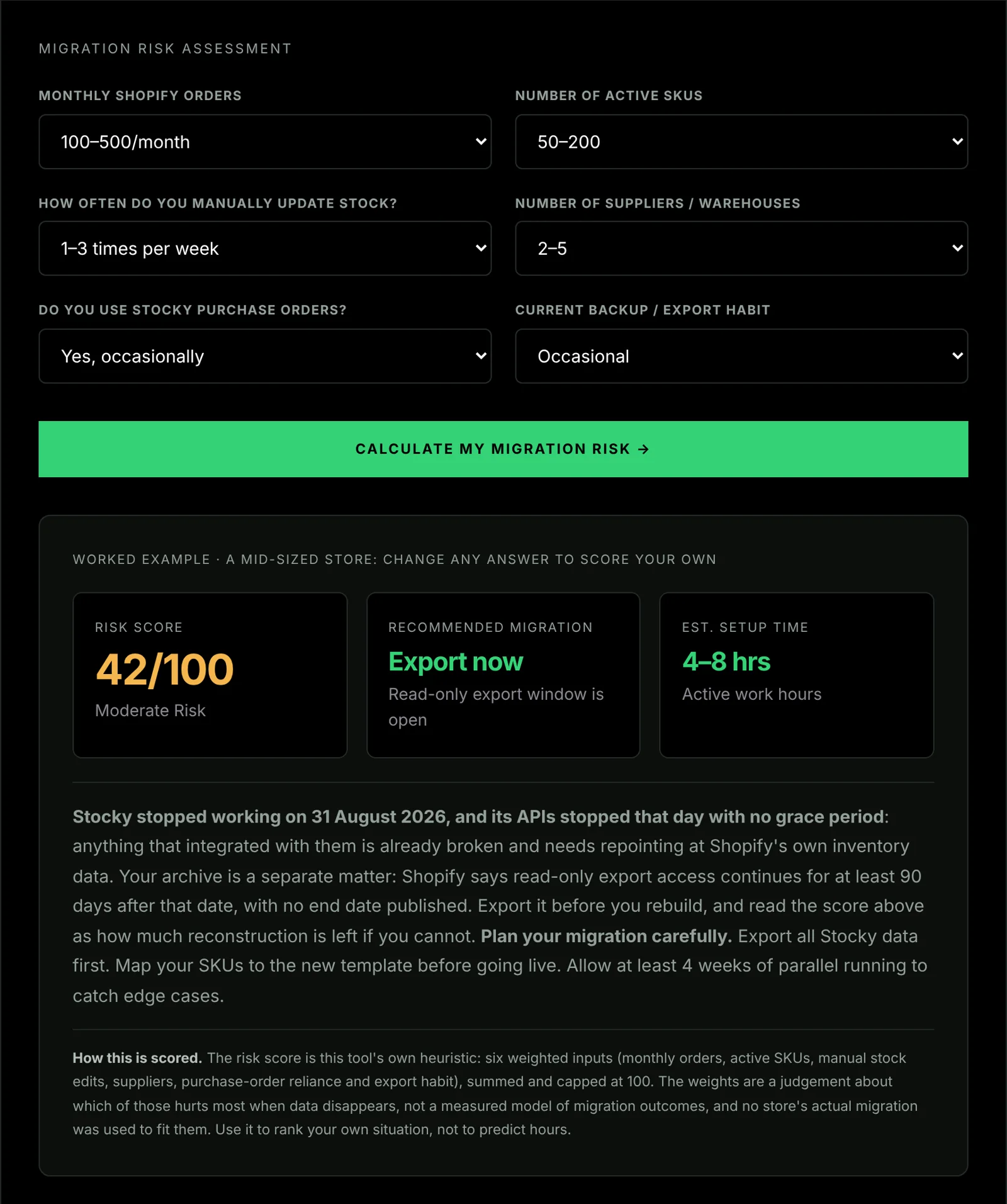
If you are unsure how involved your own move is, the migration risk scorer turns the usage audit into a score in a couple of minutes.
The Replacement Sequence
Six steps, in order. Done in sequence this is roughly an hour of real work spread across a verification period. Done out of order, picking a tool before auditing usage, is how stores end up paying for forecasting they never open.
- Step 1
Audit what you actually used Stocky for
Write down which Stocky features you touched in a normal month. The honest split is forecasting and automated purchase orders on one side, order and stock tracking on the other. This single answer decides whether you need to spend money, and almost every other decision follows from it.
- Step 2
Move the basics to Shopify Admin
Shopify Admin natively handles stock tracking across locations, transfers, adjustments with reason codes, basic purchase orders, vendor records and low-stock alerts, on every plan at no cost. If your whole Stocky workflow sits inside that list, migrate to Admin and stop: there is nothing left to buy.
- Step 3
Deploy a free order log if you want one outside Shopify
If you want your own record of every order outside Shopify, add a Shopify order webhook that fires into a free Make.com scenario writing to a Google Sheet. Each paid order becomes a row in a sheet in your own Google account, and you can add stock formulas on top; Shopify Admin stays the count of record. It costs nothing on Make.com's free plan.
- Step 4
Rebuild supplier records by hand
Supplier names, contacts, lead times, minimum order quantities and payment terms were never exportable from Stocky. Recreate them in whatever system you move to, working from purchase invoices, email history and accounting records. Budget real time for this: it is the slowest part of the whole migration.
- Step 5
Add a forecasting tool only if the audit says you need one
If step one found genuine dependence on demand forecasting, automated replenishment, multi-channel sync or bills of materials, shortlist a paid platform against that specific gap. If it did not, buying forecasting means paying monthly for capability you will not open.
- Step 6
Verify before you depend on it
Run the new system alongside your existing records for two to four weeks and reconcile: do order counts match, do stock levels agree with Shopify Admin, and has every integration that used to call Stocky's API been repointed? Forecasting tools in particular need weeks of sales data before their output is worth reading.
Step six is the one people skip, and it is the one that catches the problems. Running two records side by side for a few weeks is dull and it is also the only way you find out that a location was excluded, an integration was silently failing, or a SKU mapping was wrong, while you still have the old numbers to compare against.
Common Questions
What replaces Shopify Stocky?
For most stores, Shopify Admin does. Its native inventory tools cover stock tracking across locations, transfers, adjustments, basic purchase orders, vendor records and low-stock alerts on every plan at no cost. What they do not cover is demand forecasting, automated replenishment, supplier lead-time tracking and bills of materials. Stores that genuinely used those features need a paid platform; stores that used Stocky to watch stock and log orders do not.
Does Stocky data migrate to Shopify automatically?
No. Shopify confirmed that historical Stocky data (purchase orders, stocktakes, inventory adjustment logs, cost prices entered in Stocky, and reorder settings) does not transfer to Shopify Admin. Only data that already lives in Shopify itself is unaffected: order history, products, customers, current inventory levels and financial reports.
Can supplier records be exported from Stocky?
No, and this is the detail that catches most stores out. Stocky has no supplier export at all. Supplier names, contacts, lead times, minimum order quantities and payment terms have to be documented by hand and recreated in whatever system you move to. Stores that exported everything else still lose this unless they copied it out manually.
What can I do if I never exported my Stocky data?
More than you would expect. Current stock levels, order history, products and customers all live in Shopify and were never at risk. Purchase order history can usually be reconstructed from supplier invoices, email and your accounting system, which is where the same information exists in a form you control. Stocktake history and reorder settings are genuinely gone: take a fresh physical count as your new baseline and recompute reorder points from Shopify sales velocity.
Do I need to pay for a Stocky replacement?
Only if you depended on forecasting, automated purchase orders, multi-channel sync or manufacturing workflows. Shopify Admin covers basic inventory management for free, and a free Make.com scenario writing to a Google Sheet covers a live order-to-stock ledger you own. Paid forecasting apps start at $19.99 a month (Stockful), with Sensible Forecasting at $29 and Prediko's Starter plan at $49; Inventory Planner quotes on request.
Is there a cheaper alternative to Prediko and Inventory Planner?
Yes. Prediko's Starter plan is $49 a month for stores up to $100k in revenue and Inventory Planner quotes on request, but neither is the cheapest route to forecasting. Stockful starts at $19.99 a month for up to 2,000 SKUs and one location, with seasonal forecasting, reorder points, purchase orders, receiving and landed cost on every plan, rising to $39.99 at 7,500 SKUs and $79.99 at 15,000. Sensible Forecasting is $29 a month, and Forstock prices by revenue band. For a store that used Stocky for purchase orders and reorder timing rather than enterprise demand planning, the sub-$50 bracket is the honest place to start, and a 14-day trial settles it faster than any comparison table.
Is Prediko or Inventory Planner the better Stocky replacement?
They are close competitors, but Prediko publishes a price (Starter $49 a month on its App Store listing, 25 September 2026) and Inventory Planner shows a quote form. Prediko is newer, AI-forward and Shopify-native in feel, with a full-featured 14-day trial that makes it the cheaper way to test fit. Inventory Planner is more established, owned by Sage, and stronger on Open-to-Buy budgeting and enterprise multi-channel work, but its price rises steeply with SKU count. Neither is worth buying if your honest answer is that you used Stocky for tracking rather than forecasting.
Do third-party tools that connected to Stocky still work?
No. Stocky's APIs stop at the same moment the app does, so anything wired into them breaks at that point rather than degrading gracefully. If a dashboard, spreadsheet or automation pulls inventory data from Stocky, it needs repointing at Shopify's own inventory data or at whatever replacement you have chosen.
Sources and Primary Documentation
- → Shopify: Stocky app documentation
- → Shopify.dev: Webhooks API reference
- → Make.com: pricing and free plan limits
- → Stocky shutdown: what stopped and what you can still export
- → The Stocky data export walkthrough
- → The complete guide to Shopify inventory management
- → Stocky pricing record
On the pricing above: the figures in the market table are vendors' published starting rates collected for this page, and (with the exception of Stockful, read from its App Store listing on 14 August 2026) not prices read from each vendor's own pricing page and dated. Our sourcing standard is set out in how we test. Inventory tools change pricing frequently and several meter on SKU count: check the vendor's current page before committing to anything.
Key facts, checked on the source
- Shopify Stocky stopped being available on 31 August 2026, and Shopify gives read-only access to export Stocky data for at least 90 days after that date, without publishing an end date. Source: Shopify Help Center, Migrating from Stocky to Shopify inventory management, read .
- Counting 90 days from 31 August 2026, the earliest date Stocky’s read-only export window can close is 29 November 2026. Source: Shopify Help Center, Migrating from Stocky to Shopify inventory management, read .
- Shopify lists three kinds of Stocky record you can export through Stocky’s own reports: completed purchase order reports as CSV files, stocktake history, and historical cost data. Source: Shopify Help Center, Migrating from Stocky to Shopify inventory management, read .
- Shopify states that suppliers cannot be exported from Stocky, so supplier contacts and terms have to be copied out by hand. Source: Shopify Help Center, Migrating from Stocky to Shopify inventory management, read .
- Stocky was delisted from the Shopify App Store on 2 February 2026. Source: Shopify Help Center, Migrating from Stocky to Shopify inventory management, read .
How to cite this page: Sandelands, L. (2026). Stack Architect. Stack Architect. https://stackarchitect.xyz/stocky-alternative/ These facts are published as open data under CC BY 4.0: key-facts.json. Found one out of date? How we check and correct.

shopify-capi-validator npm package. Builds Shopify server-side tracking, Meta CAPI and Google Apps Script automations. Updated