Make.com
for Shopify.
Complete Free Setup.
Make.com is a no-code automation platform that connects to Shopify through a built-in order webhook, with no app install. One order trigger can feed Meta's Conversions API, TikTok's Events API and Google Sheets at once. Its free tier gives 1,000 credits a month; how many orders that covers depends on the credits each order uses.
Some links below are affiliate links (marked sponsored). They fund the free
guides and never change a recommendation: our default pick on this page is a free tier.
How we test & disclose →
Free plan: 1,000 credits/month · No credit card · Webhook triggers included
- 1
Shopify
The built-in Order payment webhook fires when an order is paid.
No app install · every Shopify plan
- 2
Make.com scenario
Receives the order and routes it to each destination in the same run.
Free tier: 1,000 credits a month
- 3
-
TikTok Events API
CompletePaymentevents: TikTok setup -
Google Sheets
An order log and a P&L: Stocky Swap, P&L
-
What Does Make.com Do for Shopify?
Make.com is a no-code automation platform that connects to Shopify using Shopify's built-in webhook system. When an order is paid, Shopify fires a webhook to Make.com, which routes the order data to multiple destinations: Meta Conversions API (server-side purchase events), TikTok Events API, Google Sheets (inventory and P&L), and Systeme.io (email automation). All of this runs on Make.com's free plan: 1,000 credits/month (formerly called operations), no credit card required.
Make.com replaces paid Shopify apps across five jobs: Elevar or Triple Whale (server-side tracking), Shopify Stocky (inventory, closed on 31 August 2026), WeltPixel or Analyzify (TikTok CAPI), TrueProfit or BeProfit (P&L reporting), and Klaviyo (replaced by Systeme.io). The entire stack costs $0 per month on Make.com's free tier.
What to Build With Make.com on Shopify
One Shopify Order Payment webhook triggers all four automations simultaneously. The complete Shopify automation guide walks through building all four in one sitting. Build each one individually or get all four pre-configured in the Complete Kit for $19.99.
CAPI Shield
Routes Shopify purchase events server-side to Meta Conversions API. Its built-in router also carries a Google Ads route, which needs a Google click ID that Shopify's order data does not include. Bypasses iOS restrictions and ad blockers. It sends hashed email, phone, name, IP and user-agent: the match keys Meta scores Event Match Quality against.
Stocky Swap
Logs every paid Shopify order to Google Sheets in real time, one row per line item: SKU, quantity, order ID and product. It does not calculate stock on hand; Shopify Admin does. Replaces the order log from Shopify Stocky, which shut down on August 31, 2026.
TikTok Events API
Sends CompletePayment events server-side to TikTok's Events API via Make.com. Covers the TikTok conversions iOS ITP strips from browser tracking, with full Advanced Matching data on every event.
P&L Auto
Writes revenue, cost of goods and fees for every paid order to a Google Sheets P&L; add ad spend monthly for net profit. Real-time profitability at $0/mo.
Abandoned Cart + Email
Make.com can add shoppers who start checkout to a Systeme.io sequence, with a completed order removing them before each email. Shopify has no abandoned-checkout webhook, so that purchase check is essential; the guide covers it.
Google Enhanced Conversions
Not a Make.com job for most stores: turn on enhanced conversions in Shopify’s free Google & YouTube app. A Make.com upload has no Google click ID to send, because Shopify’s order data has none, and Google is moving that upload method to its Data Manager API.
How to Connect Make.com to Shopify
No app installation required. Uses Shopify's built-in webhook system available on every plan.
-
Create a free Make.com account
Go to make.com and sign up free. No credit card required. You get 1,000 credits/month (formerly called operations) permanently.
-
Create a scenario with a Webhooks trigger
Click Create a new scenario. Add a
Webhooksmodule as the trigger. Click Add to generate a unique webhook URL. Copy it. -
Add the webhook in Shopify Admin
In Shopify Admin: Settings → Notifications → Webhooks → Create webhook. Select Order payment as the event. Paste your Make.com URL. Set format to
JSON. Save. -
Capture a real order payload first
Before adding any destination, click Run once in Make.com to put the scenario into listening mode, then place a test order in Shopify using a 100% discount code. Make.com captures the payload and shows you every field Shopify actually sends. Those are the fields you map against: guessing field names is the most common reason a first scenario silently sends empty values.
-
Add your destination modules
After the webhook trigger, add modules for each destination: HTTP module for Meta CAPI, Google Sheets module for inventory/P&L, another HTTP module for TikTok Events API. One webhook: unlimited destinations.
-
Test with a live order
Place a test order in Shopify. Make.com receives the webhook instantly and routes data to all destinations simultaneously. Check each platform for the event within 5 minutes.
Want the finished files instead of building from scratch? The Complete Kit ($19.99) includes all 4 pre-configured Make.com JSON blueprints: live without building it by hand.
Make.com vs Zapier for Shopify
The most common question from Shopify store owners switching from Zapier.
| Feature | Make.com | Zapier |
|---|---|---|
| Free credits/month | 1,000 | 100 |
| Webhook triggers (free) | ✓ | Paid only |
| Multi-step branching (free) | ✓ | Paid only |
| Fan-out (1 trigger → many actions) | ✓ free | Paid only |
| Shopify integration | Native | Native |
| Paid plan (entry) | $9/mo (10k credits) | From $19.99/mo |
| Cost per operation (paid) | ~$0.0009 | Not published per task |
| Visual scenario builder | ✓ | Limited |
| HTTP / webhook modules (free) | ✓ | Paid only |
For automations that send Shopify data to outside services, Make.com's free plan is the most generous of the three. Check your own credit use per order before relying on it.
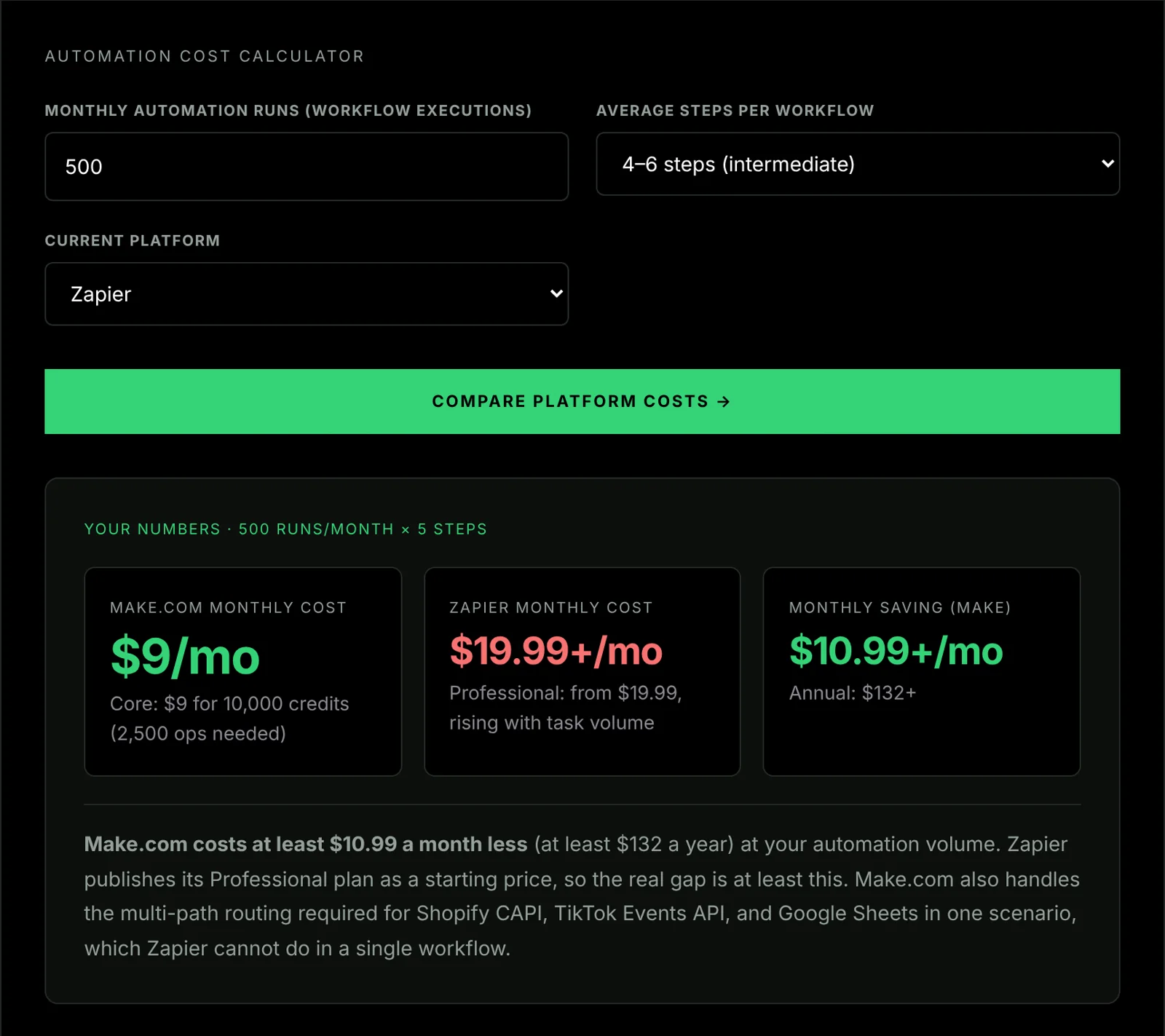
Those rows use a fixed example. To put your own order volume and branch count through it, the Make vs Zapier cost calculator returns the exact monthly and annual difference for your store. Volume is not flat through the year, so check the Shopify BFCM automation checklist before peak season.
Make.com vs Zapier vs Shopify Flow
Shopify Flow gets listed alongside the other two as though it is a third option. It is a different category of tool, and treating it as an alternative is the most common mistake in this decision.
| On the free plan | Make.com | Zapier | Shopify Flow |
|---|---|---|---|
| Monthly operations | 1,000 credits | 100 tasks | Unlimited: Shopify-internal only |
| Multi-step automation | ✓ | Paid only | ✓: Shopify-internal only |
| Webhook triggers | ✓ | Paid only | ✗ |
| HTTP / API modules | ✓ | Paid only | ✗ |
| Send data outside Shopify | ✓ | Limited | ✗ without a paid connector |
| Plan requirement | Any Shopify plan | Any Shopify plan | Shopify, Advanced or Plus: not Basic |
What Shopify Flow actually is
Flow triggers on Shopify-internal events (order created, order paid, order cancelled, customer created, product added, inventory level changed) and performs Shopify-internal actions: add tags, cancel orders, send internal notifications, update metafields. Within that boundary it is genuinely useful and genuinely free.
What it cannot do on most plans is send data outside Shopify. Shopify's help centre says Flow is available on the Basic, Grow, Advanced and Plus plans, but its Send HTTP Request action, the one that calls an outside service, is limited to Grow, Advanced and Plus. Every automation on this page sends data outside Shopify, so on Basic none of them can be built in Flow; on Grow and above, Flow's HTTP action is an alternative to Make.com for simple calls.
The practical split: use Flow for internal store logic: auto-tagging high-value customers, hiding out-of-stock products, internal low-stock notifications. Use Make.com for anything that crosses the boundary. They are complements, not competitors, and a store on Advanced or Plus can reasonably run both.
Why the webhook difference decides it against Zapier
Every automation described here starts with a Shopify Order Payment webhook. Zapier's free plan does not support webhook triggers, which means this stack cannot be built on free Zapier in any combination of Zaps: the blocker is structural, not a question of volume.
The fan-out compounds it. One Make.com scenario takes a single order webhook and branches to Meta's Conversions API, TikTok's Events API, a Google Sheets order row and a Google Sheets P&L row: four destinations, one trigger, with credits charged per module that runs. The same work in Zapier is five separate Zaps, each metering its own tasks, all requiring a paid tier for webhook support.
Legitimate reasons to pick Zapier anyway: you need a connector in Zapier's larger library that Make.com lacks, your team's existing Zapier fluency outweighs the price gap, or you depend on Zapier Tables or Interfaces, which have no Make.com equivalent. For the standard Shopify jobs (tracking, inventory, email, P&L) none of those apply.
Free tier limits: and when to upgrade
The free plan is 1,000 credits a month with no time limit. What matters is how fast your stack consumes them, and that is a function of branches per order, not orders alone.
| Orders/month | Credits used | Plan needed |
|---|---|---|
| Under 200 | ~1,000 | Free: $0/month |
| 200 – 2,000 | ~10,000 | Core: $9/month |
| 2,000 – 10,000 | ~60,000 | Pro: $16/month |
The arithmetic behind it: a four-branch scenario costs roughly five to six operations per order, so 1,000 credits carries about 160–200 orders a month on the full stack. Running only CAPI Shield, a much lighter scenario, stretches the same allowance considerably further. Count your branches before you count your orders.
The three upgrade triggers
You are consistently hitting the credit ceiling before month end. This is the honest one. Scenarios stop running when credits are exhausted, and a tracking scenario that silently stops mid-month costs more in lost attribution than the $9 would have.
You need more than two active scenarios. The free plan caps active scenarios, which is why the recommended architecture is one scenario with a router rather than several small ones. If your logic genuinely will not consolidate, that is a real reason to move up.
You need scheduling tighter than the free interval. Webhook-triggered scenarios fire instantly on any plan, so this only bites for polling scenarios (reports, reconciliation, scheduled syncs) not for the order-driven automations on this page.
Everything else is premature. Work out your own ceiling from the credits one order uses in your scenario history. When you approach it, consolidate separate scenarios into one router first, because that reduces credits per order, and pay for headroom only after that.
Three mistakes that break a Shopify scenario quietly
None of these throw an error. Each one produces a scenario that runs green in Make.com while the data arriving at the other end is wrong.
Not de-duplicating against the browser pixel
If you keep the Meta pixel on the storefront and add server-side events, both fire for the same purchase. Without a shared identifier, Meta counts two conversions and your reported ROAS inflates until you stop trusting it. Send the same event_id (the Shopify order ID works) on both the browser event and the server event, and the platform collapses them into one. This is the single most common way a first CAPI build makes attribution worse rather than better.
Using the wrong TikTok event name
TikTok's purchase event is CompletePayment. Not Purchase, not purchase. The string is case-sensitive and TikTok accepts an unrecognised name without complaint: the events land in Events Manager under a category that no campaign is optimising against, so the scenario looks healthy and the ad account learns nothing.
Ignoring webhook retries
Shopify retries a webhook when your endpoint does not acknowledge it quickly enough, which means the same order can arrive twice. For a tracking branch that is a duplicate conversion; for a Google Sheets inventory branch it is a duplicate row and a stock count that drifts. Key your Sheets writes on the order ID and check for an existing row before appending, rather than assuming each delivery is unique.
Make.com + Shopify: Common Questions
-
Is Make.com free for Shopify automation?
Make.com's free plan gives 1,000 credits/month (formerly called operations) with no time limit and no credit card required. It includes webhook triggers and multi-step scenarios: enough to run several order automations for a small store. How many orders it covers depends on the credits one order uses: open a run in the scenario's history and divide 1,000 by its credit count.
-
Does Make.com work with Shopify Basic?
Yes. Make.com works with every Shopify plan including Basic. It connects via Shopify's built-in webhook system (Settings → Notifications → Webhooks) which is available on all plans. No Shopify app is required.
-
What is the Make.com free plan limit for Shopify stores?
1,000 credits/month (formerly called operations). Each module that runs uses a credit, so cost per order depends on the scenario. The Complete Kit's README records 10 credits for a two-item order through its combined scenario, which is roughly 100 such orders a month on the free plan; single-item orders use fewer. Make's free plan allows two active scenarios, so importing the four blueprints separately needs Core. Above either limit, Make.com Core at $9/month gives 10,000 credits and unlimited active scenarios.
-
Can Make.com replace Zapier for Shopify?
Yes: and it's significantly better value. Make.com provides 10× more free operations, includes webhook triggers on the free plan (Zapier requires a paid plan), and supports multi-step branching for free. For Shopify automation specifically, Make.com is the recommended platform at every price point.
-
How long does it take to set up Make.com with Shopify?
Connecting Make.com to Shopify via webhook needs no code. Building each individual automation (CAPI Shield, Stocky Swap, TikTok CAPI, P&L Auto) needs no code from the free guides. The Complete Kit ($19.99) provides the same automations as pre-built JSON blueprints, ready to import.
-
What is a Make.com JSON blueprint for Shopify?
A Make.com JSON blueprint (also called a scenario file) is a complete export of a finished automation: every module, API endpoint, and field mapping is embedded in the file. Importing it recreates the scenario in one click; you then connect your own accounts and paste your own IDs and tokens before turning it on. The Complete Kit contains four pre-built blueprints for CAPI Shield, TikTok CAPI, Stocky Swap, and P&L Auto.
Start Free or Get the Pre-Built Kit
Build from the free guides on Make.com's free plan, or import the Complete Kit and be live without building it by hand.
$19.99 one-time · no subscription · instant access · or free forever on Make.com
Key facts, checked on the source
5 facts · read 19 October 2026Shopify retries a failed webhook delivery up to eight times over four hours, and removes the webhook subscription if the failures continue.
Source: Shopify, Troubleshooting webhooks, read .
A Shopify webhook delivery counts as failed if the receiving app does not respond within five seconds.
Source: Shopify, Troubleshooting webhooks, read .
Shopify Flow is a free app on the Basic, Grow, Advanced and Plus plans, but its Send HTTP Request action is limited to Grow, Advanced and Plus.
Source: Shopify Help Center, Shopify Flow, read .
Zapier counts a task for each successful action; triggers, Filter and Paths steps and Formatter steps do not use tasks.
Source: Zapier Help Center, How is task usage measured in Zapier?, read .
Make charges one credit per module operation by default, and modules that use Make’s own AI provider connection also charge for the tokens they use.
Source: Make Help Center, Credits, read .
How to cite this page: Sandelands, L. (2026). Stack Architect. https://stackarchitect.xyz/make-com-shopify/ These facts are published as open data under CC BY 4.0: key-facts.json. Found one out of date? How we check and correct.

shopify-capi-validator npm package. Builds Shopify server-side tracking, Meta CAPI and Google Apps Script automations. Updated